Български
Тема
Днес ще се научите да:
and, or, not;if / elif / else - версията на Python на CASE WHEN от SQL;match;while и for и спирате или прескачате с break и continue;От SQL към Python - един и същ въпрос, по два начина:
SELECT CASE WHEN days_past_due = 0  THEN 'current'
            WHEN days_past_due <= 30 THEN '1-30'
            WHEN days_past_due <= 90 THEN '31-90'
            ELSE '90+' END AS bucket,
       COUNT(*)
FROM loans
GROUP BY 1;current = up_to_30 = up_to_90 = over_90 = 0
with open("data/loans.csv", encoding="utf-8") as file:
file.readline() # skip the header line
for line in file: # one loan per line
days_past_due = int(line.split(",")[9]) # the 10th column
if days_past_due == 0:
current += 1
elif days_past_due <= 30:
up_to_30 += 1
elif days_past_due <= 90:
up_to_90 += 1
else:
over_90 += 1
print("current", current)
print("1-30 ", up_to_30)
print("31-90 ", up_to_90)
print("90+ ", over_90)До края на днешното занятие ще можете да прочетете всеки ред от този пример. В занятие 15 pandas прави същото с два реда - но отвътре прави точно това.
bool Булевата стойност (на името на математика Джордж Бул) е една от две стойности: True или False. Те са стойности, като 0 и 1 - а не имена на променливи. Обърнете внимание на главните букви.
print(type(True), type(False))
print(3 > 2)
print(type(3 > 2))Булевите стойности са резултатът от сравненията (раздел 2) и входът на всяко решение (раздели 4 - 8) и на всеки цикъл while (раздел 11).
if и while приемат всяка стойност, не само True и False. Python решава по правилата, които видяхте в занятие 1 (truthy и falsy):
| Тип | False | True |
|---|---|---|
| числа | 0, 0.0 | всяко друго число, също -1 и 0.00001 |
| strings | "" (празен) | всеки непразен string, също " ", "0", "False" |
| колекции (lists, tuples, sets, dictionaries) | празни | непразни |
None | винаги | - |
bool() показва решението:
print(bool(-42), bool(0), bool(0.00001))
print(bool("ada"), bool(""), bool(" "))
print(bool(None), bool([]), bool([0]))Това е полезно с данни от файлове. В clients.csv клиентите на дребно имат празен код на отрасъла - а празният string е falsy:
industry = ""              # a retail client: the field is empty in the file

if industry:
    print("industry:", industry)
else:
print("no industry code")0 е falsy, None е falsy - но те не са едно и също
if days_past_due: е невярно и за 0 (кредит, който не е просрочен), и за None (стойността липсва). Когато "липсва" и "нула" означават различни неща - а в данните за риска обикновено е така - проверявайте за None изрично: if days_past_due is None:.
Резултатът от сравнение винаги е True или False:
| Оператор | Значение | SQL | SAS |
|---|---|---|---|
< | по-малко | < | <, LT |
<= | по-малко или равно | <= | <=, LE |
> | по-голямо | > | >, GT |
>= | по-голямо или равно | >= | >=, GE |
== | равно | = | =, EQ |
!= | различно | <> | ^=, NE |
is, is not | същият обект (идентичност) | IS NULL (само за None) | |
in, not in | е елемент на | IN (...) | IN (...) |
days_past_due = 45
print(days_past_due < 45, days_past_due <= 45)
print(9 < 1000)
print(days_past_due != 0)

product = "mortgage"
print(product in ("mortgage", "consumer"))     # like SQL: product IN ('mortgage', 'consumer')
print("age" in "mortgage") # in a string: is it a part of it?is сравнява обекти, а не стойности (занятие 1, анимацията "Names and objects"). Използвайте го само с None: x is None, x is not None.
Python не сравнява "круши с ябълки". <, >, <=, >= между число и string са грешка:
print(2 < "1")== не дава грешка - резултатът е просто False. Това е истински капан с данни от файлове, където всяка стойност е string:
stage = "3"                # read from a CSV file: a string
print(stage == 3)          # False - a str is never equal to an int
print(int(stage) == 3) # True - convert firstЧисла от различни типове се сравняват, както очаквате: 1 == 1.0 е True, и True == 1 също е True.
Добра практика
Уверете се, че сравнявате стойности от един и същ тип. Първо преобразувайте данните - int(), float(), str() (занятие 1) - и после сравнявайте.
print("2" == str(2))
print(int("2") >= 2)
print(99999 >= int("2"))Python 2 можеше да сравнява стойности от различни типове: "2" >= 2 беше True, 99999 >= "2" беше False - без никаква грешка и без никакъв смисъл. Ако срещнете стар код, който прави това, в Python 3 това е бъг.
Strings се сравняват лексикографски, като думите в речник: първо първите символи; ако са равни - вторите и т.н. Всеки символ се сравнява по номера си (неговия code point) в таблицата Unicode, а ord() показва този номер:
print("9" < "1000")          # False!
print(ord("9"), ord("1"))    # 57 49: "9" is after "1"
print("Z" < "a")             # True: all capital letters come before the small ones
print("mortgage" < "overdraft")"9" < "1000" е False, защото решават само първите символи: "9" (57) не е по-малко от "1" (49). Числа, записани като текст, се сортират грешно - първо ги преобразувайте.
Датите във формат ISO YYYY-MM-DD (форматът на примерните данни) са изключение, което работи: първо е годината, после месецът, после денят, всички с фиксиран брой цифри. В българския формат DD.MM.YYYY това не работи:
print("2026-01-15" < "2026-09-30")      # True - right
print("15.01.2026" < "30.09.2025") # True - wrong: "1" < "3"Истинските дати (datetime) идват в занятие 7.
Сравненията могат да се свързват във верига, като BETWEEN в SQL (занятие 1):
days_past_due = 45
print(30 < days_past_due <= 90)      # the same as: 30 < days_past_due and days_past_due <= 90
x = 5
print(0 < x < 10)Два float, които "би трябвало" да са равни, може да не са (занятие 1, раздел 14). Сравнявайте ги с толеранс:
import math

share = 0.1 + 0.2
print(share == 0.3)
print(math.isclose(share, 0.3))and, or, not Логическите оператори комбинират прости условия в по-големи - "кредитът е просрочен с повече от 90 дни или клиентът е в default":
| Операция | Резултат |
|---|---|
x or y | ако x е falsy, тогава y, иначе x |
x and y | ако x е falsy, тогава x, иначе y |
not x | ако x е falsy, тогава True, иначе False |
Таблицата на истинност (Truth table) - кой операнд е резултатът, е в скоби:
x | y | x and y | x or y | not x |
|---|---|---|---|---|
| True | True | True (y) | True (x) | False |
| True | False | False (y) | True (x) | False |
| False | True | False (x) | True (y) | True |
| False | False | False (x) | False (y) | True |
days_past_due = 120
rating = 6

print(days_past_due > 90 or rating == 10)       # stage 3?
print(days_past_due > 30 and rating >= 7)
print(not days_past_due > 90)
print(True and False)and и or изчисляват дясната страна само ако е нужно (short-circuit evaluation). Когато x е falsy, x and y е falsy, каквото и да е y - затова y изобщо не се изчислява. Това ви пази от грешки:
count = 0
total = 0.0

# total / count would be ZeroDivisionError - but it is never calculated
print(count > 0 and total / count > 1000)and и or връщат един от операндите си and и or не винаги връщат True или False: те връщат една от двете стойности. not винаги връща bool.
print(0 and 1)
print(0 or 1)
print(1 or 0)
print(not 1, not 0)

user_name = ""
print(user_name and "Anonymous")
print(user_name or "***Anonymous***")x or default е кратък начин да дадете стойност по подразбиране - като COALESCE(x, default) в SQL. Но внимавайте: той заменя всяка falsy стойност, също и 0:
rate = 0.0                      # a real rate of 0%: a promotional loan
print(rate or 5.0)              # 5.0 - wrong!
print(rate if rate is not None else 5.0) # 0.0 - right (section 7)not, после and, после or Като * преди +: първо се прилага not, после and, после or (пълната таблица е в занятие 1, раздел 11). Използвайте скоби, когато смесвате and и or:
days_past_due, rating, restructured = 10, 8, False

print(days_past_due > 30 or rating >= 7 and restructured)       # or (rating >= 7 and restructured)
print((days_past_due > 30 or rating >= 7) and not restructured)NULL в SQL и липсващите стойности в SAS
В SQL NULL AND TRUE е NULL (неизвестно) и WHERE изпуска реда. В SAS липсваща стойност в условие се брои за невярно. В Python None е просто falsy: None and True е None, а if None: не изпълнява блока си.
Анимация
Как се изчислява един израз (занятие 1): 5. Верижни сравнения, 6. and / or
if Обикновено програмата изпълнява един statement след друг, отгоре надолу. Конструкциите за управление (control flow statements) променят това: изпълняват блок само когато условие е вярно (if) или го изпълняват отново и отново (while, for).
if condition:
blockif идва условието, после двоеточие :.end - отстъпът казва къде свършва блокът (занятие 1, раздел 8).days_past_due = 120
if days_past_due > 90:
print(f"{days_past_due} days: non-performing")
print("move to stage 3")
print("checked")Същото в SAS и SQL:
if days_past_due > 90 then do;
    put "non-performing";
    stage = 3;
end;CASE WHEN days_past_due > 90 THEN 3 ENDif False:
print("1")
print("2")
print("3")print("1") и print("2") образуват блока: те се изпълняват само ако условието е вярно. print("3") не е в блока - той се изпълнява винаги.
pass: блок, който не прави нищо Python не позволява празен блок. Когато ви трябва такъв - засега или нарочно - напишете pass:
rating = 3

if rating <= 4:
    pass            # investment grade: nothing to do (yet)
print("done")pass работи във всеки блок: if, for, while, функции (занятие 4).
if - else if condition:
block 1
else:
block 2Изпълнява се точно един от двата блока: блок 1, когато условието е вярно, блок 2, когато е невярно.
x = 41
if x % 2 == 0:
    print(f"{x} is an EVEN number")
else:
print(f"{x} is an ODD number")report_language = "bg"
if report_language == "bg":
print("Портфейл към 30.09.2026")
else:
print("Portfolio on 30.09.2026")
print("-" * 30)Върху портфейла:
days_past_due = 0

if days_past_due > 0:
    status = "late"
else:
    status = "current"
print(status)if - elif - else if condition 1:
block 1
elif condition 2:
block 2
elif condition 3:
block 3
else:
block 4elif означава "else if" (иначе ако). Частите elif може да са колкото ви трябват, а else накрая не е задължителен. Python проверява условията отгоре надолу и изпълнява само първия блок, чието условие е вярно; останалите се прескачат. Точно така работи CASE WHEN в SQL.
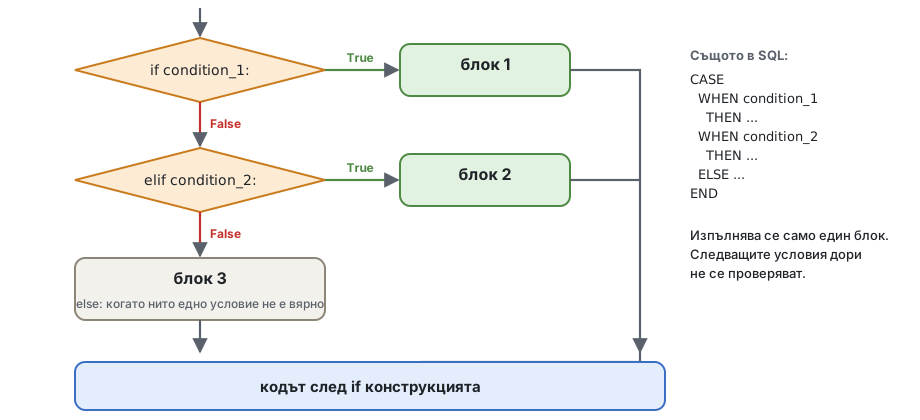
user_language = "it"

if user_language == "bg":
    print("Здравейте")
elif user_language == "it":
    print("Ciao")
elif user_language == "en":
    print("Hello")
else:
    print("I do not speak your language!")
print("-" * 20)CASE WHEN в Python Групите по дни просрочие:
CASE WHEN days_past_due = 0   THEN 'current'
     WHEN days_past_due <= 30 THEN '1-30'
     WHEN days_past_due <= 60 THEN '31-60'
     WHEN days_past_due <= 90 THEN '61-90'
     ELSE '90+'
ENDif days_past_due = 0 then bucket = 'current';
else if days_past_due <= 30 then bucket = '1-30';
else if days_past_due <= 60 then bucket = '31-60';
else if days_past_due <= 90 then bucket = '61-90';
else bucket = '90+';days_past_due = 45
if days_past_due == 0:
bucket = "current"
elif days_past_due <= 30:
bucket = "1-30"
elif days_past_due <= 60:
bucket = "31-60"
elif days_past_due <= 90:
bucket = "61-90"
else:
bucket = "90+"
print(bucket)Второто условие няма нужда от days_past_due > 0 and ...: щом сме стигнали дотам, първото вече е било невярно.
Анимация
Циклите стъпка по стъпка: 2. Решения в цикъл
Понеже печели първото вярно условие, редът на условията е част от логиката. Намерете бъга:
days_past_due = 120

if days_past_due > 0:
    bucket = "late"
elif days_past_due > 90:
    bucket = "non-performing"
else:
    bucket = "current"

print(bucket)120 е повече от 0, така че се изпълнява първият блок и Python никога не проверява > 90: кредитът е само "late". Сложете най-строгото условие първо: > 90, после > 0.
Рейтинговата скала на примерните данни дава клас за всеки интервал на вероятността от неизпълнение (PD). Първи опит, с двата края на всеки интервал:
pd_value = 0.00055          # between 0.0005 and 0.0006

if 0 <= pd_value <= 0.0005:
    grade = "AAA"
elif 0.0006 <= pd_value <= 0.001:
    grade = "AA"
elif 0.0011 <= pd_value <= 0.0025:
    grade = "A"
else:
    grade = "not rated"

print(grade)0.00055 попада в дупката между два интервала и кредитът получава "not rated". С десетични числа винаги има нещо между две стойности, които пишете. Сигурният начин: проверявайте само горната граница, по ред - всяка стойност попада в точно един интервал:
pd_value = 0.00055

if pd_value < 0.0005:
    grade = "AAA"
elif pd_value < 0.001:
    grade = "AA"
elif pd_value < 0.0025:
    grade = "A"
elif pd_value < 0.006:
    grade = "BBB"
else:
    grade = "BB or worse"

print(grade)if или and? Един if може да е вътре в друг if. Често and казва същото по-плоско - "Flat is better than nested" (Zen of Python):
segment = "retail"
outstanding = 250000.0

# nested
if segment == "retail":
    if outstanding > 200000:
        print("large retail exposure")

# the same, flat
if segment == "retail" and outstanding > 200000:
print("large retail exposure")Правилото на примерните данни: етап 3, когато кредитът е просрочен с повече от 90 дни или клиентът е в default (рейтинг 10); етап 2, когато е просрочен с повече от 30 дни или рейтингът е 7 или по-лош; иначе етап 1.
days_past_due = 35
rating = 5

if days_past_due > 90 or rating == 10:
    stage = 3
elif days_past_due > 30 or rating >= 7:
    stage = 2
else:
    stage = 1

print(stage)value_1 if condition else value_2 Когато един if - else само избира между две стойности, условният израз (в други езици: тернарният оператор) го казва на един ред:
x if condition else yPython изчислява условието; ако е вярно, резултатът е x, иначе y.
days_past_due = 0
status = "late" if days_past_due > 0 else "current"
print(status)

user_age = 5
print("adult" if user_age >= 18 else "child")Същото като:
user_age = 5
if user_age >= 18:
    print("adult")
else:
print("child")| SQL | SAS | Python |
|---|---|---|
CASE WHEN dpd > 0 THEN 'late' ELSE 'current' END | ifc(dpd > 0, 'late', 'current') | "late" if dpd > 0 else "current" |
COALESCE(rate, 5) | coalesce(rate, 5) | rate if rate is not None else 5 |
Условните изрази могат да се влагат, но два от тях на един ред вече се четат трудно - използвайте if / elif / else.
2 + 3, rate * 2, "late" if dpd > 0 else "current", извикване на функция. Можете да го отпечатате или да му дадете име.x = 5, if, for, while, import. Той няма стойност.Изразите са части от statements: в x = 5 + 3 5 + 3 е израз, а целият ред е statement. Затова условен израз може да стои вдясно от =, а if statement - не може:
dpd = 10
status = if dpd > 0: "late" # SyntaxError: if is a statementmatch match (от Python 3.10) сравнява една стойност със списък от patterns, дадени в блокове case, и изпълнява първия, който пасва. Прилича на SELECT / WHEN в SAS DATA step или на switch в C и Java:
select (product);
    when ('mortgage', 'consumer', 'credit_card', 'overdraft') group = 'retail';
    when ('working_capital', 'investment')                    group = 'business';
    otherwise                                                 group = 'other';
end;product = "credit_card"
match product:
case "mortgage" | "consumer" | "credit_card" | "overdraft":
group = "retail"
case "working_capital" | "investment":
group = "business"
case _:
group = "other"
print(group)| означава "или": случаят пасва на всяка от стойностите.case _: пасва на всичко - случаят по подразбиране, като otherwise и ELSE. Пишете го последен.match е най-добър за фиксирани стойности: кодове, продукти, избори от меню. За интервали от числа използвайте if / elif.
След pattern if добавя условие (guard). case dpd if dpd > 90: означава "вземи стойността, наречи я dpd и пасвай само ако dpd > 90":
days_past_due = 45

match days_past_due:
    case 0:
        bucket = "current"
    case dpd if dpd <= 30:
        bucket = "1-30"
    case dpd if dpd <= 90:
        bucket = "31-90"
    case _:
        bucket = "90+"

print(bucket)За интервали от числа if / elif е по-ясно.
Име в case хваща всичко. В case обикновеното име не се сравнява - то хваща (captures) стойността. Този случай пасва на всеки сегмент:
RETAIL = "retail"
segment = "corporate"

match segment:
    case RETAIL:                 # not "== RETAIL": it binds the name RETAIL!
        print("retail")

print(RETAIL) # corporate - the constant is lost tooС case _: след него Python дори отказва да изпълни кода: SyntaxError: name capture 'RETAIL' makes remaining patterns unreachable. Пишете самите стойности (case "retail":) или имена с точка (case Segment.RETAIL:, занятие 11).
if - elif По-старият код (и по-старите курсове) пише същото с if / elif. Типично меню на програма (то иска input(), затова го пробвайте във VS Code):
print("Select a report:")
print("1. Portfolio by product")
print("2. Portfolio by stage")
print("3. Late loans")

choice = input("Enter a number [1-3]: ")
if choice == "1":
    print("Report 1 ...")
elif choice == "2":
    print("Report 2 ...")
elif choice == "3":
    print("Report 3 ...")
else:
    print("Wrong input!")
Същото с match:
match input("Enter a number [1-3]: "):
    case "1":
        print("Report 1 ...")
    case "2":
        print("Report 2 ...")
    case "3":
        print("Report 3 ...")
    case _:
print("Wrong input!")Pattern може и да разглоби tuple (tuples: занятие 3). Всяко име в pattern получава своята част от стойността:
record = ("L000002", "investment", 35)

match record:
    case (loan_id, _, 0):
        print(loan_id, "current")
    case (loan_id, product, dpd) if dpd > 30:
        print(loan_id, product, "more than 30 days late:", dpd)
    case _:
print("other")Още: match statements в tutorial-а и ръководството за pattern matching (PEP 636).
По желание
Не е нужно за задачите, домашното или следващите занятия - прочетете го, когато имате време.
Преговор на занятие 1, раздел 11, за условията.
Редът, в който се изчисляват частите на един израз, решава резултата. Грешните предположения за него водят до бъгове:
print(2 + 3 * 4)        # 14, not 20
print((2 + 3) * 4) # 20Кратката версия на таблицата (пълната е в занятие 1, раздел 11, и в Python reference): аритметика, после сравнения (<, ==, in, is, ...), после not, после and, после or, а условният израз ... if ... else ... - най-накрая.
days_past_due, rating, restructured = 35, 7, True

# hard to read
print(days_past_due > 30 and rating >= 7 or restructured and not days_past_due == 0)

# the same, with names for the parts
is_late = days_past_due > 30 and rating >= 7
is_restructured_and_late = restructured and days_past_due != 0
print(is_late or is_restructured_and_late)Цикълът (loop) изпълнява блок от код много пъти. Всяко изпълнение на блока е итерация. Python има два цикъла:
while повтаря, докато условие е вярно - когато не знаете предварително колко пъти (раздел 11);for повтаря за всеки елемент на поредица - редовете на файл, елементите на list, числата на range (раздел 12).В SAS вече използвате цикли: DATA step-ът е цикъл - той се изпълнява веднъж за всеки ред на входния набор от данни, без да го пишете. В Python пишете цикъла сами (а в pandas - пак не, занятие 14).
| SAS | Python |
|---|---|
неявният цикъл на DATA step по SET | for line in file: |
do i = 1 to 12; ... end; | for i in range(1, 13): - обърнете внимание на 13 |
do i = 0 to 100 by 10; | for i in range(0, 101, 10): |
do while (balance > 0); | while balance > 0: |
do until (balance <= 0); | while True: ... if balance <= 0: break (раздел 13) |
leave; | break |
continue; | continue |
total + amount; (sum statement, с RETAIN) | total += amount, с total = 0 преди цикъла |
while while condition:
blockБлокът се изпълнява отново и отново, докато условието е вярно. Преди всяка итерация Python проверява условието; когато е невярно, цикълът свършва и програмата продължава след блока.
Вътре в блока нещо трябва да променя условието - иначе цикълът никога не свършва. (Или break го спира, раздел 13.)
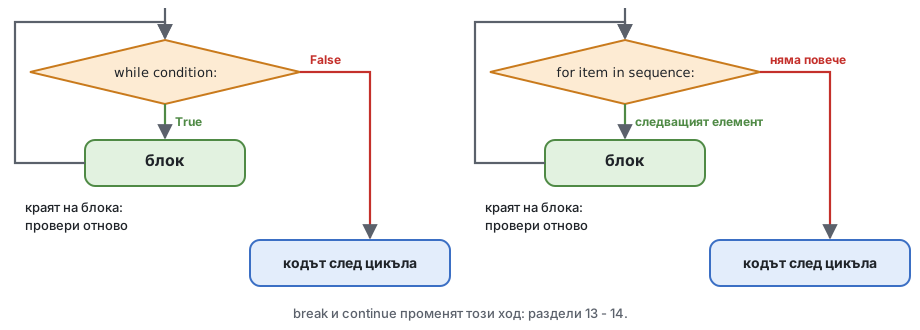
i = 1
while i <= 5:
    print(i)
i += 1Това е само прост пример. За фиксиран брой итерации цикъл for с range е по-добър (раздел 12).
Този цикъл никога не свършва (не го пускайте тук - във VS Code Ctrl+C в терминала спира работеща програма):
# print the numbers from 10 down to 1
i = 10
while i >= 1:
    print(i)
i = 1i = 1 задава на i стойност 1 във всяка итерация, а 1 >= 1 винаги е вярно. Трябва да е i -= 1 (i = i - 1).
while е правилният цикъл Използвайте while, когато не знаете предварително колко итерации трябват. За колко месеца се погасяват 20 000 EUR при 6% годишно, с 450 EUR на месец?
balance = 20000.0
monthly_rate = 6 / 12 / 100
payment = 450.0
months = 0

while balance > 0:
    interest = balance * monthly_rate
    balance = balance + interest - payment
    months += 1

print(months, "months")
print(f"the last payment was {payment + balance:.2f}") # balance is negative nowНачинът в SAS е същият цикъл:
data _null_;
    balance = 20000; monthly_rate = 6 / 12 / 100; payment = 450; months = 0;
    do while (balance > 0);
        balance = balance + balance * monthly_rate - payment;
        months + 1;
    end;
    put months=;
run;
Анимация
Циклите стъпка по стъпка: 3. while: погасяване на кредит
Друг типичен случай е проверката на това, което въвежда потребителят - програмата пита отново, докато отговорът не е правилен. С input(), затова го пробвайте във VS Code:
# ask for a name until it has at least 3 characters
user_name = input("Enter a name, please: ")
while len(user_name) < 3:
    user_name = input("Enter a name (at least 3 characters): ")
print(f"Thank you, {user_name}!")
Редът с input() е написан два пъти - раздел 13 показва по-чист начин с while True и break.
for for name in sequence:
blockfor взема елементите на поредица един по един; във всяка итерация името сочи следващия елемент и блокът се изпълнява. Цикълът свършва след последния елемент. Не броите, и цикълът не може да продължи вечно.
for letter in "ada":
    print(letter.capitalize())
for Всичко, което дава елементи един по един - iterable. Днес: string (символите му), range от числа, няколко стойности в квадратни скоби и редовете на файл. Квадратните скоби правят list - занятие 3 е изцяло за lists; засега четете [0, 35, 120] просто като "тези стойности, една по една". Tuples (занятие 3) и dictionaries (занятие 6) идват по-късно.
for item in "byron":                # a string
    print(item, end=",")
print()
for item in range(1, 3):            # a range: 1 and 2
    print(item, end=",")
print()
for item in [10, 20, 30]:           # a few values: a list (session 3)
print(item, end=",")range: поредица от числа range(stop), range(start, stop) и range(start, stop, step) дават цели числа от start (0, ако не е даден) до stop - 1 - самият stop не е включен. Подробностите са в занятие 3.
for n in range(1, 6):
    print(n, end=" ")
print()
for month in range(3, 13, 3):       # the quarter ends: 3, 6, 9, 12
print(month, end=" ")SAS брои до края, range спира преди него
do month = 1 to 12; се изпълнява 12 пъти, за 1 ... 12. В Python range(1, 12) спира на 11: пишете range(1, 13). range(12) също се изпълнява 12 пъти, но за 0 ... 11.
Цикълът често натрупва резултат: променлива получава начална стойност преди цикъла и се променя във всяка итерация. В SAS това е sum statement или RETAIN.
total_sum = 0
for n in range(1, 11):
    total_sum += n
print(f"total_sum={total_sum}")      # 55
print(sum(range(1, 11))) # the built-in function does the sameСума, брой и максимум в един цикъл:
days_past_due_values = [0, 35, 0, 120, 5, 0, 200]

count_late = 0
max_days = 0
for days in days_past_due_values:
    if days > 0:
        count_late += 1
    if days > max_days:
        max_days = days

print(count_late, "late loans, the worst is", max_days, "days")Анимация
Циклите стъпка по стъпка: 1. for с акумулатор
Когато всеки елемент е двойка стойности в кръгли скоби - (1, "one"), tuple (занятие 3) - for може да даде на всяка част собствено име:
pairs = [(1, "one"), (2, "two"), (3, "three")]
for number, name in pairs:
print(f"{number} is {name}")Днес ви трябва само това. Занятие 3 показва lists от записи като този, а занятие 6 обхожда dictionary по същия начин.
Един цикъл може да е вътре в друг цикъл. Вътрешният цикъл се изпълнява изцяло във всяка итерация на външния:
for i in range(1, 4):
    for letter in "abc":
        print(f"{i}{letter}", end=" ")
print() # a new line after each rowТримесечията на две години (в SAS: два вложени цикъла do):
for year in range(2025, 2027):
    for quarter in range(1, 5):
        print(f"{year}-Q{quarter}", end=" ")
print()Върху портфейла - месечната вноска за няколко суми и срока, мрежа като тази, която би отпечатал PROC TABULATE в SAS:
yearly_rate = 6
monthly_rate = yearly_rate / 12 / 100

print(f"{'years':>6}", end="")
for amount in range(10000, 50001, 20000):     # 10000, 30000, 50000
    print(f"{amount:>12,}", end="")
print()

for years in range(1, 6):
    print(f"{years:>6}", end="")
    n = years * 12
    for amount in range(10000, 50001, 20000):
        payment = amount * monthly_rate / (1 - (1 + monthly_rate) ** -n)
        print(f"{payment:>12,.2f}", end="")
print()Таблиците в паметта - list от редове - и циклите по тях идват в занятие 5.
Текстовият файл е поредица от редове, затова for може да го чете ред по ред - като DATA step в SAS с INFILE или SET. Шаблонът (подробностите за with open идват в занятие 9):
with open("data/loans.csv", encoding="utf-8") as file:
    header = file.readline()            # the first line: the column names
    print(header.strip())
    for line in file:                   # the other lines, one per iteration
        fields = line.strip().split(",")
        print(fields)
break # only the first loan for now (section 13)split(",") разрязва реда при запетаите и дава полетата като strings, в квадратни скоби: list (занятие 3). Имената вляво от = ги вземат по ред (както при "няколко имена наведнъж", занятие 1) - после преобразувайте тези, които ви трябват:
total = 0.0
count = 0
stage_3 = 0

with open("data/loans.csv", encoding="utf-8") as file:
    file.readline()
    for line in file:
        (loan_id, client_id, product, currency, start_date, maturity_date,
         amount, outstanding, rate, days_past_due, stage) = line.strip().split(",")
        total += float(outstanding)
        count += 1
        if stage == "3":
            stage_3 += 1

print(f"{count} loans, outstanding {total:,.2f} EUR, {stage_3} in stage 3")SELECT COUNT(*), SUM(outstanding), SUM(CASE WHEN stage = 3 THEN 1 ELSE 0 END)
FROM loans;(За простота примерът събира суми в EUR и USD заедно - истинският отчет първо ги преобразува.)
break break спира най-вътрешния цикъл for или while веднага; програмата продължава след цикъла. Почти винаги е вътре в if:
for item in sequence:            while condition:
    block 1                          block 1
    if break_condition:              if break_condition:
        break                            break
    block 2                          block 2
Когато условието за break е вярно, блок 2 се прескача и цикълът свършва.
for s in "alibaba":
    if s == "i":
        break
print(s)Търсене - спрете веднага щом намерите:
days_past_due_values = [0, 35, 0, 120, 5, 200]

for days in days_past_due_values:
    if days > 90:
        print(f"the first non-performing loan: {days} days past due")
        break
print(days, "- not yet")Анимация
Циклите стъпка по стъпка: 4. break: спрете при първия
break във вложени цикли break излиза само от цикъла, в който е - външният цикъл продължава:
for year in range(2025, 2028):
    print(year, end=": ")
    for month in range(1, 13):
        if month > 3:
            break               # leaves the inner loop only: the first quarter
        print(month, end=",")
print() # the outer loop goes on with the next yeardo until: цикъл, който се изпълнява поне веднъж Python няма цикъл do ... while (C, Java) и няма do until (SAS) - "there should be one obvious way to do it". Те са полезни, когато блокът трябва да се изпълни поне веднъж и проверката е накрая. Начинът на Python е while True с break:
while True:
    block
    if condition:
        break
Проверката на името от раздел 11, без да пишете input() два пъти:
while True:
    user_name = input("Enter a name (at least 3 characters): ")
    if len(user_name) >= 3:
        break
print(f"Thank you, {user_name}!")
Върху портфейла - изплащаме остатък, докато стане 0. В SAS това е do until:
do until (balance <= 0);
    balance = balance - payment;
end;balance = 1000.0
payment = 300.0
months = 0
while True: # do ...
balance -= payment
months += 1
if balance <= 0: # ... until balance <= 0
break
print(months, balance)След търсене с break как разбирате дали нещо е намерено? Задайте флаг преди цикъла - като found = 0; в DATA step в SAS:
days_past_due_values = [0, 35, 0, 5]

found = False
for days in days_past_due_values:
    if days > 90:
        found = True
        print("found a non-performing loan:", days)
        break

if not found:
print("no loan is more than 90 days past due")else на цикълЦикъл for или while може да има блок else. Той се изпълнява, когато цикълът свърши нормално - а не когато break го е спрял. Той замества флага:
days_past_due_values = [0, 35, 0, 5]

for days in days_past_due_values:
    if days > 90:
        print("found a non-performing loan:", days)
        break
else:
print("no loan is more than 90 days past due")Четете else на цикъл като "no break" (без break). Рядко се използва и изненадва много читатели - флагът е по-ясен.
Циклите стъпка по стъпка: 6. for - else (за напреднали)
continue continue спира текущата итерация и минава към следващата: останалата част от блока се прескача, а цикълът продължава (при while: с проверката на условието). Почти винаги е вътре в if:
for item in sequence:            while condition:
    block 1                          block 1
    if continue_condition:           if continue_condition:
        continue                         continue
    block 2                          block 2
Отпечатайте числата от 1 до 5, но прескочете 3:
for i in range(1, 6):
    if i == 3:
        continue
print(i, end=",")Отпечатайте дума без гласните:
word = "abcdefghi"
vowels = "aeiou"
for letter in word:
    if letter in vowels:
        continue
print(letter, end=",")В работата с данни continue прескача записите, които не искате - като WHERE в SQL или subsetting IF или DELETE в DATA step в SAS. Пребройте само кредитите в USD и прескочете празните редове. Тук редът е запазен като един list, fields, и fields[3] е четвъртото му поле: позициите се броят от 0 (занятие 3 обяснява защо).
usd_count = 0
usd_total = 0.0

with open("data/loans.csv", encoding="utf-8") as file:
    file.readline()
    for line in file:
        if not line.strip():                # an empty line: skip it
            continue
        fields = line.strip().split(",")
        if fields[3] != "USD":              # the 4th field (the count starts at 0): currency
            continue
        usd_count += 1
        usd_total += float(fields[7])       # the 8th field: outstanding

print(usd_count, f"{usd_total:,.2f}")continue държи основния код вляво, без още едно ниво отстъп. if с обратното условие прави същото - изберете това, което се чете по-добре.
Анимация
Циклите стъпка по стъпка: 5. continue: прескачане на запис
break и continue в една схема (else на картинката е от карето "За напреднали" в раздел 13):
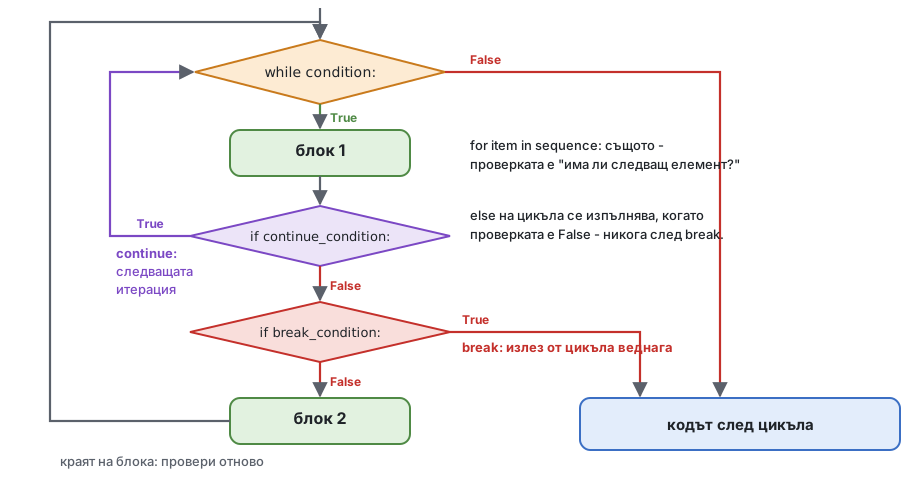
Проследете схемата, без да изпълнявате кода: какво отпечатва този цикъл?
for i in range(1, 6):
    if i == 2:
        continue
    if i == 4:
        break
print(i)1 и 3. При 2 continue се връща към проверката, затова 2 не се отпечатва. При 4 break излиза от цикъла: 4 и 5 никога не се отпечатват.
Анюитетен кредит (занятие 1): една и съща вноска всеки месец. Всеки месец лихвата се изчислява върху остатъка, а останалата част от вноската погасява главницата.
data schedule;
    balance = 20000; monthly_rate = 6 / 12 / 100; n = 12;
    payment = balance * monthly_rate / (1 - (1 + monthly_rate) ** -n);
    do month = 1 to n;
        interest = balance * monthly_rate;
        principal = payment - interest;
        balance = balance - principal;
        output;
    end;
run;amount = 20000.0
monthly_rate = 6 / 12 / 100
n = 12
payment = amount * monthly_rate / (1 - (1 + monthly_rate) ** -n)
balance = amount
total_interest = 0.0
print(f"{'month':>5}{'payment':>11}{'interest':>11}{'principal':>11}{'balance':>12}")
for month in range(1, n + 1):
interest = balance * monthly_rate
principal = payment - interest
balance -= principal
total_interest += interest
print(f"{month:>5}{payment:>11,.2f}{interest:>11,.2f}{principal:>11,.2f}{balance:>12,.2f}")
print(f"total interest: {total_interest:,.2f}")(Последният остатък може да показва -0.00: грешка от закръгляне на float от част от цента, занятие 1, раздел 14.)
По желание
Не е нужно за задачите, домашното или следващите занятия - прочетете го, когато имате време.
Класическата игра "познай числото" - "твърде високо", "твърде ниско", докато не е вярно - е и истински метод за намиране на число, което не можете да изчислите пряко. Коя годишна лихва дава вноска от точно 400 EUR за 20 000 EUR за 5 години? Вноската расте с лихвата, затова: пробвайте средата на интервала и запазете половината, в която трябва да е отговорът (бисекция, bisection):
amount = 20000.0
months = 60
target_payment = 400.0

low, high = 0.0, 30.0              # the yearly rate is somewhere in 0% ... 30%
tries = 0

while high - low > 0.00001:
    rate = (low + high) / 2        # guess: the middle
    r = rate / 12 / 100
    payment = amount * r / (1 - (1 + r) ** -months)
    if payment > target_payment:   # too high: the rate must be lower
        high = rate
    else:                          # too low: the rate must be higher
        low = rate
    tries += 1

print(f"rate {rate:.4f}% after {tries} tries")Всеки опит разполовява интервала, така че след 22 опита той е по-малък от 0.00001%. Същата идея намира ефективния лихвен процент (ГПР, APR) на кредит с такси или вътрешната норма на възвръщаемост (IRR) на паричен поток.
Отворете своето копие на Homework repository във VS Code (преди занятието: вземете новите задачи) и пускайте задачите от терминала, в главната папка на repository-то:
python 02-conditions-and-loops/practice/task1-predict-logic.py| Задача | Файл | Какво правите |
|---|---|---|
| 1 | task1-predict-logic.py | Предвидете резултата на 14 сравнения и логически израза, после проверете |
| 2 | task2-buckets.py | Групата по дни просрочие и знакът на промяна, с if / elif / else |
| 3 | task3-stage-and-leap-year.py | Етапът по IFRS 9 с and / or; високосни години |
| 4 | task4-match.py | Продуктови групи и валутен конвертор с match |
| 5 | task5-loans-file.py | Цикъл по loans.csv: бройки, суми, най-големият кредит, първият кредит в етап 3 |
| 6 | task6-while.py | Месеци до погасяване на кредит с while; текстова стълбовидна диаграма с for |
В task1-predict-logic.py заменете всеки "?" с вашето предвиждане, преди да пуснете файла.
Помощ: какво ползват задачите от следващите занятия
TODO, а не FAIL - също и "?", който оставите в задача за предсказване. Частите, отбелязани по-долу като по желание, показват детайли на Python, които няма да ви трябват в работата с данни.and и or отвътре (раздел 3, "and и or връщат един от операндите си"): 0 or "n/a", "" or None, 5 and 0 и True or 1 / 0. Те са по желание - в pandas условията се съчетават с & и | (занятия 14 - 15). А "3" == 3 е False: == между string и число е позволено и различните типове никога не са равни; само <, >, <=, >= спират с TypeError.year % 4 == 0, year % 100 != 0 и year % 400 == 0 - "дели се на 4 и не се дели на 100, или се дели на 400". Сложете скоби около частта с and.largest_loan_id) и домашното, част 3: в раздел 12, "Акумулатори", се пази само най-голямата стойност. Тук ви трябва и номерът на кредита: преди цикъла - две имена, largest_outstanding = 0.0 и largest_loan_id = None; в цикъла, когато кредитът е по-голям, сменете и двете (в домашното и третото - дните просрочие).balance е отрицателен - последната вноска е била само payment + balance. Значи всички вноски заедно са payment * months + balance, а лихвата е това минус amount.for days_past_due in [0, 1, 30, ...]: или for old, new in [(1000.0, 1200.0), ...]: (раздел 12, "Две имена наведнъж"). Те само пробват кода ви с няколко стойности - пишете кода си вътре, не променяйте цикъла.break при първото stage == "3". Или запазете реда като един list, fields = line.strip().split(","): тогава fields[0] е id на кредита, а fields[10] - stage (позициите се броят от 0, занятие 3).stage_counts съдържа двойки; обходете го с две имена, for stage, count in stage_counts:, и добавяйте по един ред към chart във всяка итерация (chart += ...). "#" * 5 е "#####" (занятие 1).report с += и f-strings с ширини, както в раздел 15: f"{'current':<8}{current_count:>6}", :>18,.2f и :>8.1% за процент (занятие 1, раздел 13).FAIL: проверката сравнява целия текст, затова един интервал повече или по-малко дава FAIL. Направете print(report), после сравнете редовете got: и expected: под FAIL знак по знак - по един ред от отчета.| Тема | Запомнете |
|---|---|
| Истинност | 0, 0.0, "", None, празните колекции са falsy; всичко останало е truthy |
| Сравнения | < <= > >= == !=, in, is None; никога не сравнявайте str с число - "3" == 3 е False; strings се сравняват буква по буква |
| Логика | and, or, not; Python спира, щом знае отговора; x or default заменя и 0 |
if | if / elif / else: печели първото вярно условие - като CASE WHEN; проверявайте само едната граница на всеки интервал |
| Изрази | a if condition else b; statements правят, изразите дават стойност |
match | една стойност срещу фиксирани случаи; | за "или", case _: за останалото; guards с if |
while | докато условие е вярно; нещо в блока трябва да го промени |
for | всеки елемент на поредица: string, list, range, редовете на файл; range(1, 13) е 1 ... 12 |
break / continue | излиза от цикъла / минава към следващата итерация; while True + break = do until; флаг за "не е намерено" |
02-conditions-and-loops/homework.py (в homework repository): отчет за дните просрочие от loans.csv - броят кредити и непогасената сума във всяка група, дяловете и най-големият просрочен кредит. Всяка проверка трябва да отпечата OK.calculator.py пита за сумата, годишната лихва и годините с input(), пита отново, докато стойността не е валидна (сумата трябва да е повече от 0, лихвата - между 0 и 50, годините - между 1 и 30), и отпечатва погасителния план от раздел 15. Добавете меню с match: 1 - планът, 2 - само общата лихва, 3 - изход; повтаряйте, докато потребителят не избере 3.02-conditions-and-loops/notebook.ipynb - кратки допълнителни задачи по днешните теми в Jupyter notebook, всяка с клетка за проверка. Отворете го във VS Code и изберете kernel-а .venv.if, for, range, break, continue, else на цикли, pass, match)match: PEP 636 - ръководството за pattern matchingfor loops, while loopsСледващото занятие: lists, tuples и sets - индексиране от 0, slices, методите на list, tuples като записи и UNION / INTERSECT / EXCEPT от SQL със sets.