English
Appearance
Today you will learn to:
and, or, not;if / elif / else - the Python version of SQL CASE WHEN;match;while and for, and stop or skip with break and continue;From SQL to Python - the same question, two ways:
SELECT CASE WHEN days_past_due = 0  THEN 'current'
            WHEN days_past_due <= 30 THEN '1-30'
            WHEN days_past_due <= 90 THEN '31-90'
            ELSE '90+' END AS bucket,
       COUNT(*)
FROM loans
GROUP BY 1;current = up_to_30 = up_to_90 = over_90 = 0
with open("data/loans.csv", encoding="utf-8") as file:
file.readline() # skip the header line
for line in file: # one loan per line
days_past_due = int(line.split(",")[9]) # the 10th column
if days_past_due == 0:
current += 1
elif days_past_due <= 30:
up_to_30 += 1
elif days_past_due <= 90:
up_to_90 += 1
else:
over_90 += 1
print("current", current)
print("1-30 ", up_to_30)
print("31-90 ", up_to_90)
print("90+ ", over_90)By the end of today you will be able to read every line of this example. In session 15 pandas does the same in two lines - but it does exactly this inside.
bool A Boolean value (after the mathematician George Boole) is one of two values: True or False. They are values, like 0 and 1 - not names of variables. Note the capital letters.
print(type(True), type(False))
print(3 > 2)
print(type(3 > 2))Booleans are the result of comparisons (section 2) and the input of every decision (sections 4 - 8) and of every while loop (section 11).
if and while accept any value, not only True and False. Python decides by the rules you met in session 1 (truthy and falsy):
| Type | False | True |
|---|---|---|
| numbers | 0, 0.0 | every other number, also -1 and 0.00001 |
| strings | "" (empty) | every non-empty string, also " ", "0", "False" |
| collections (lists, tuples, sets, dictionaries) | empty | not empty |
None | always | - |
bool() shows the decision:
print(bool(-42), bool(0), bool(0.00001))
print(bool("ada"), bool(""), bool(" "))
print(bool(None), bool([]), bool([0]))This is useful with data from files. In clients.csv, retail clients have an empty industry code - and an empty string is false:
industry = ""              # a retail client: the field is empty in the file

if industry:
    print("industry:", industry)
else:
print("no industry code")0 is false, None is false - but they are not the same
if days_past_due: is false both for 0 (a loan that is not late) and for None (the value is missing). When "missing" and "zero" mean different things - and in risk data they usually do - test for None explicitly: if days_past_due is None:.
The result of a comparison is always True or False:
| Operator | Meaning | SQL | SAS |
|---|---|---|---|
< | less than | < | <, LT |
<= | less than or equal | <= | <=, LE |
> | greater than | > | >, GT |
>= | greater than or equal | >= | >=, GE |
== | equal | = | =, EQ |
!= | not equal | <> | ^=, NE |
is, is not | the same object (identity) | IS NULL (only for None) | |
in, not in | is a member of | IN (...) | IN (...) |
days_past_due = 45
print(days_past_due < 45, days_past_due <= 45)
print(9 < 1000)
print(days_past_due != 0)

product = "mortgage"
print(product in ("mortgage", "consumer"))     # like SQL: product IN ('mortgage', 'consumer')
print("age" in "mortgage") # in a string: is it a part of it?is compares objects, not values (session 1, animation "Names and objects"). Use it only with None: x is None, x is not None.
Python does not compare "apples with oranges". <, >, <=, >= between a number and a string are an error:
print(2 < "1")== does not give an error - it is simply False. This is a real trap with data from files, where every value is a string:
stage = "3"                # read from a CSV file: a string
print(stage == 3)          # False - a str is never equal to an int
print(int(stage) == 3) # True - convert firstNumbers of different types compare as you expect: 1 == 1.0 is True, and True == 1 is True too.
Best practice
Make sure you compare values of the same type. Convert the data first - int(), float(), str() (session 1) - and then compare.
print("2" == str(2))
print(int("2") >= 2)
print(99999 >= int("2"))Python 2 could compare values of different types: "2" >= 2 was True, 99999 >= "2" was False - without any error, and without any sense. If you meet old code that does this, it is a bug in Python 3.
Strings are compared lexicographically, like words in a dictionary: the first characters first; if they are equal, the second ones, and so on. Each character is compared by its number (its code point) in the Unicode table, and ord() shows that number:
print("9" < "1000")          # False!
print(ord("9"), ord("1"))    # 57 49: "9" is after "1"
print("Z" < "a")             # True: all capital letters come before the small ones
print("mortgage" < "overdraft")"9" < "1000" is False, because only the first characters decide: "9" (57) is not less than "1" (49). Numbers stored as text sort wrongly - convert them first.
Dates in the ISO format YYYY-MM-DD (the format of the sample data) are an exception that works: the year comes first, then the month, then the day, all with a fixed number of digits. In the Bulgarian format DD.MM.YYYY they do not:
print("2026-01-15" < "2026-09-30")      # True - right
print("15.01.2026" < "30.09.2025") # True - wrong: "1" < "3"Real dates (datetime) come in session 7.
Comparisons can be chained, like BETWEEN in SQL (session 1):
days_past_due = 45
print(30 < days_past_due <= 90)      # the same as: 30 < days_past_due and days_past_due <= 90
x = 5
print(0 < x < 10)Two floats that "should" be equal may not be (session 1, section 14). Compare them with a tolerance:
import math

share = 0.1 + 0.2
print(share == 0.3)
print(math.isclose(share, 0.3))and, or, not Logical operators combine simple conditions into bigger ones - "the loan is more than 90 days late or the client is in default":
| Operation | Result |
|---|---|
x or y | if x is false, then y, else x |
x and y | if x is false, then x, else y |
not x | if x is false, then True, else False |
The truth table (Truth table) - which operand is the result is in brackets:
x | y | x and y | x or y | not x |
|---|---|---|---|---|
| True | True | True (y) | True (x) | False |
| True | False | False (y) | True (x) | False |
| False | True | False (x) | True (y) | True |
| False | False | False (x) | False (y) | True |
days_past_due = 120
rating = 6

print(days_past_due > 90 or rating == 10)       # stage 3?
print(days_past_due > 30 and rating >= 7)
print(not days_past_due > 90)
print(True and False)and and or evaluate the right side only if needed (short-circuit evaluation). When x is false, x and y is false whatever y is - so y is not even calculated. This protects you from errors:
count = 0
total = 0.0

# total / count would be ZeroDivisionError - but it is never calculated
print(count > 0 and total / count > 1000)and and or return one of their operands and and or do not always return True or False: they return one of the two values. not always returns a bool.
print(0 and 1)
print(0 or 1)
print(1 or 0)
print(not 1, not 0)

user_name = ""
print(user_name and "Anonymous")
print(user_name or "***Anonymous***")x or default is a short way to give a default value - like COALESCE(x, default) in SQL. But be careful: it replaces every falsy value, also 0:
rate = 0.0                      # a real rate of 0%: a promotional loan
print(rate or 5.0)              # 5.0 - wrong!
print(rate if rate is not None else 5.0) # 0.0 - right (section 7)not, then and, then or Like * before +: not is applied first, then and, then or (the full table is in session 1, section 11). Use brackets when you mix and and or:
days_past_due, rating, restructured = 10, 8, False

print(days_past_due > 30 or rating >= 7 and restructured)       # or (rating >= 7 and restructured)
print((days_past_due > 30 or rating >= 7) and not restructured)SQL NULL and SAS missing values
In SQL, NULL AND TRUE is NULL (unknown), and a WHERE drops the row. In SAS, a missing value in a condition counts as false. In Python, None is simply falsy: None and True is None, and if None: does not run its block.
Animation
How an expression is evaluated (session 1): 5. Chained comparisons, 6. and / or
if statement Normally a program runs one statement after the other, from top to bottom. The control flow statements change that: they run a block only when a condition is true (if), or run it again and again (while, for).
if condition:
blockif comes the condition, then a colon :.end - the indentation says where the block ends (session 1, section 8).days_past_due = 120
if days_past_due > 90:
print(f"{days_past_due} days: non-performing")
print("move to stage 3")
print("checked")The same in SAS and SQL:
if days_past_due > 90 then do;
    put "non-performing";
    stage = 3;
end;CASE WHEN days_past_due > 90 THEN 3 ENDif False:
print("1")
print("2")
print("3")print("1") and print("2") form the block: they run only if the condition is true. print("3") is not in the block - it always runs.
pass: a block that does nothing Python does not allow an empty block. When you need one - for now, or on purpose - write pass:
rating = 3

if rating <= 4:
    pass            # investment grade: nothing to do (yet)
print("done")pass works in every block: if, for, while, functions (session 4).
if - else if condition:
block 1
else:
block 2Exactly one of the two blocks runs: block 1 when the condition is true, block 2 when it is false.
x = 41
if x % 2 == 0:
    print(f"{x} is an EVEN number")
else:
print(f"{x} is an ODD number")report_language = "bg"
if report_language == "bg":
print("Портфейл към 30.09.2026")
else:
print("Portfolio on 30.09.2026")
print("-" * 30)On the portfolio:
days_past_due = 0

if days_past_due > 0:
    status = "late"
else:
    status = "current"
print(status)if - elif - else if condition 1:
block 1
elif condition 2:
block 2
elif condition 3:
block 3
else:
block 4elif means "else if". There can be as many elif parts as you need, and the else at the end is optional. Python tests the conditions from top to bottom and runs only the first block whose condition is true; the rest are skipped. This is exactly how CASE WHEN works in SQL.
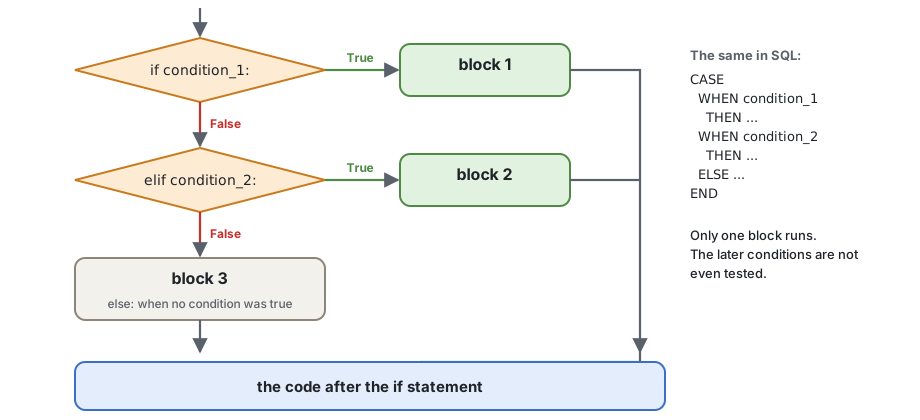
user_language = "it"

if user_language == "bg":
    print("Здравейте")
elif user_language == "it":
    print("Ciao")
elif user_language == "en":
    print("Hello")
else:
    print("I do not speak your language!")
print("-" * 20)CASE WHEN in Python The buckets of days past due:
CASE WHEN days_past_due = 0   THEN 'current'
     WHEN days_past_due <= 30 THEN '1-30'
     WHEN days_past_due <= 60 THEN '31-60'
     WHEN days_past_due <= 90 THEN '61-90'
     ELSE '90+'
ENDif days_past_due = 0 then bucket = 'current';
else if days_past_due <= 30 then bucket = '1-30';
else if days_past_due <= 60 then bucket = '31-60';
else if days_past_due <= 90 then bucket = '61-90';
else bucket = '90+';days_past_due = 45
if days_past_due == 0:
bucket = "current"
elif days_past_due <= 30:
bucket = "1-30"
elif days_past_due <= 60:
bucket = "31-60"
elif days_past_due <= 90:
bucket = "61-90"
else:
bucket = "90+"
print(bucket)The second condition does not need days_past_due > 0 and ...: if we got there, the first one was already false.
Animation
Loops step by step: 2. Decisions in a loop
Because the first true condition wins, the order of the conditions is part of the logic. Find the bug:
days_past_due = 120

if days_past_due > 0:
    bucket = "late"
elif days_past_due > 90:
    bucket = "non-performing"
else:
    bucket = "current"

print(bucket)120 is more than 0, so the first block runs and Python never tests > 90: the loan is only "late". Put the strictest condition first: > 90, then > 0.
The rating scale of the sample data gives a grade for each band of the probability of default (PD). A first try, with both ends of each band:
pd_value = 0.00055          # between 0.0005 and 0.0006

if 0 <= pd_value <= 0.0005:
    grade = "AAA"
elif 0.0006 <= pd_value <= 0.001:
    grade = "AA"
elif 0.0011 <= pd_value <= 0.0025:
    grade = "A"
else:
    grade = "not rated"

print(grade)0.00055 falls into the gap between two bands, and the loan gets "not rated". With decimal numbers there is always something between two values you write. The safe way: test only the upper bound, in order - every value lands in exactly one band:
pd_value = 0.00055

if pd_value < 0.0005:
    grade = "AAA"
elif pd_value < 0.001:
    grade = "AA"
elif pd_value < 0.0025:
    grade = "A"
elif pd_value < 0.006:
    grade = "BBB"
else:
    grade = "BB or worse"

print(grade)if or and? An if can be inside another if. Often and says the same in a flatter way - "Flat is better than nested" (the Zen of Python):
segment = "retail"
outstanding = 250000.0

# nested
if segment == "retail":
    if outstanding > 200000:
        print("large retail exposure")

# the same, flat
if segment == "retail" and outstanding > 200000:
print("large retail exposure")The rule of the sample data: stage 3 when the loan is more than 90 days past due or the client is in default (rating 10); stage 2 when it is more than 30 days past due or the rating is 7 or worse; otherwise stage 1.
days_past_due = 35
rating = 5

if days_past_due > 90 or rating == 10:
    stage = 3
elif days_past_due > 30 or rating >= 7:
    stage = 2
else:
    stage = 1

print(stage)value_1 if condition else value_2 When an if - else only chooses between two values, a conditional expression (in other languages: the ternary operator) says it in one line:
x if condition else yPython evaluates the condition; if it is true, the result is x, otherwise y.
days_past_due = 0
status = "late" if days_past_due > 0 else "current"
print(status)

user_age = 5
print("adult" if user_age >= 18 else "child")The same as:
user_age = 5
if user_age >= 18:
    print("adult")
else:
print("child")| SQL | SAS | Python |
|---|---|---|
CASE WHEN dpd > 0 THEN 'late' ELSE 'current' END | ifc(dpd > 0, 'late', 'current') | "late" if dpd > 0 else "current" |
COALESCE(rate, 5) | coalesce(rate, 5) | rate if rate is not None else 5 |
Conditional expressions can be nested, but two of them in one line are already hard to read - use if / elif / else instead.
2 + 3, rate * 2, "late" if dpd > 0 else "current", a function call. You can print it, or give it a name.x = 5, if, for, while, import. It has no value.Expressions are parts of statements: in x = 5 + 3, 5 + 3 is an expression and the whole line is a statement. That is why a conditional expression can stand on the right of =, but an if statement cannot:
dpd = 10
status = if dpd > 0: "late" # SyntaxError: if is a statementmatch match (since Python 3.10) compares one value with a list of patterns, given in case blocks, and runs the first one that fits. It is like SELECT / WHEN in a SAS DATA step, or switch in C and Java:
select (product);
    when ('mortgage', 'consumer', 'credit_card', 'overdraft') group = 'retail';
    when ('working_capital', 'investment')                    group = 'business';
    otherwise                                                 group = 'other';
end;product = "credit_card"
match product:
case "mortgage" | "consumer" | "credit_card" | "overdraft":
group = "retail"
case "working_capital" | "investment":
group = "business"
case _:
group = "other"
print(group)| means "or": the case fits any of the values.case _: fits everything - the default, like otherwise and ELSE. Write it last.match is best for fixed values: codes, products, menu choices. For ranges of numbers, use if / elif.
After a pattern, if adds a condition (a guard). case dpd if dpd > 90: means "take the value, call it dpd, and fit only if dpd > 90":
days_past_due = 45

match days_past_due:
    case 0:
        bucket = "current"
    case dpd if dpd <= 30:
        bucket = "1-30"
    case dpd if dpd <= 90:
        bucket = "31-90"
    case _:
        bucket = "90+"

print(bucket)For ranges of numbers, if / elif is clearer.
A name in a case catches everything. In a case, a plain name is not compared - it captures the value. This case fits every segment:
RETAIL = "retail"
segment = "corporate"

match segment:
    case RETAIL:                 # not "== RETAIL": it binds the name RETAIL!
        print("retail")

print(RETAIL) # corporate - the constant is lost tooWith a case _: after it, Python even refuses to run the code: SyntaxError: name capture 'RETAIL' makes remaining patterns unreachable. Write the values themselves (case "retail":), or dotted names (case Segment.RETAIL:, session 11).
if - elif chains Older code (and older courses) write the same with if / elif. A typical program menu (this one needs input(), so try it in VS Code):
print("Select a report:")
print("1. Portfolio by product")
print("2. Portfolio by stage")
print("3. Late loans")

choice = input("Enter a number [1-3]: ")
if choice == "1":
    print("Report 1 ...")
elif choice == "2":
    print("Report 2 ...")
elif choice == "3":
    print("Report 3 ...")
else:
    print("Wrong input!")
The same with match:
match input("Enter a number [1-3]: "):
    case "1":
        print("Report 1 ...")
    case "2":
        print("Report 2 ...")
    case "3":
        print("Report 3 ...")
    case _:
print("Wrong input!")A pattern can also take a tuple apart (tuples: session 3). Each name in the pattern gets its part of the value:
record = ("L000002", "investment", 35)

match record:
    case (loan_id, _, 0):
        print(loan_id, "current")
    case (loan_id, product, dpd) if dpd > 30:
        print(loan_id, product, "more than 30 days late:", dpd)
    case _:
print("other")More: match statements in the tutorial, and the pattern matching tutorial (PEP 636).
Optional
Not needed for the tasks, the homework or the next sessions - read it when you have time.
A recap of session 1, section 11, for conditions.
The order in which the parts of an expression are calculated decides the result. Wrong assumptions about it lead to bugs:
print(2 + 3 * 4)        # 14, not 20
print((2 + 3) * 4) # 20The short version of the table (the full one in session 1, section 11, and in the Python reference): arithmetic, then comparisons (<, ==, in, is, ...), then not, then and, then or, and the conditional expression ... if ... else ... last of all.
days_past_due, rating, restructured = 35, 7, True

# hard to read
print(days_past_due > 30 and rating >= 7 or restructured and not days_past_due == 0)

# the same, with names for the parts
is_late = days_past_due > 30 and rating >= 7
is_restructured_and_late = restructured and days_past_due != 0
print(is_late or is_restructured_and_late)A loop runs a block of code many times. Each run of the block is an iteration. Python has two loops:
while repeats while a condition is true - when you do not know in advance how many times (section 11);for repeats for each item of a sequence - the rows of a file, the items of a list, the numbers of a range (section 12).You already use loops in SAS: the DATA step is a loop - it runs once for each row of the input data set, without you writing it. In Python you write the loop yourself (and in pandas, again, you do not - session 14).
| SAS | Python |
|---|---|
the implicit loop of the DATA step over SET | for line in file: |
do i = 1 to 12; ... end; | for i in range(1, 13): - note the 13 |
do i = 0 to 100 by 10; | for i in range(0, 101, 10): |
do while (balance > 0); | while balance > 0: |
do until (balance <= 0); | while True: ... if balance <= 0: break (section 13) |
leave; | break |
continue; | continue |
total + amount; (the sum statement, with RETAIN) | total += amount, with total = 0 before the loop |
while loop while condition:
blockThe block runs again and again while the condition is true. Before each iteration Python tests the condition; when it is false, the loop ends and the program continues after the block.
Inside the block, something must change the condition - otherwise the loop never ends. (Or a break stops it, section 13.)
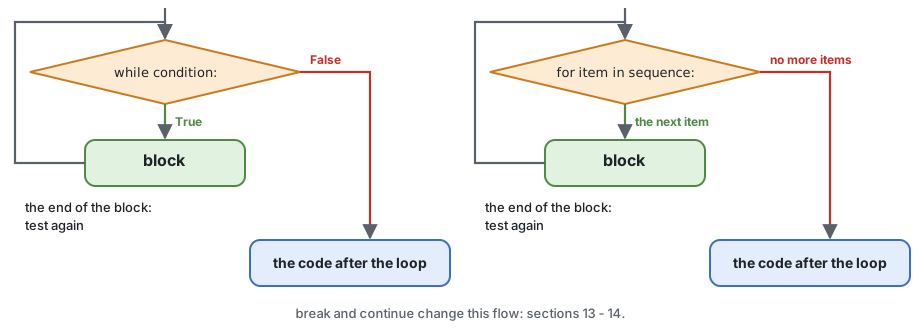
i = 1
while i <= 5:
    print(i)
i += 1This is just a simple example. For a fixed number of iterations, a for loop with range is better (section 12).
This loop never ends (do not run it here - in VS Code, Ctrl+C in the terminal stops a running program):
# print the numbers from 10 down to 1
i = 10
while i >= 1:
    print(i)
i = 1i = 1 sets i to 1 in every iteration, and 1 >= 1 is always true. It should be i -= 1 (i = i - 1).
while is the right loop Use while when you do not know in advance how many iterations are needed. How many months does it take to repay 20 000 EUR at 6% a year, with 450 EUR a month?
balance = 20000.0
monthly_rate = 6 / 12 / 100
payment = 450.0
months = 0

while balance > 0:
    interest = balance * monthly_rate
    balance = balance + interest - payment
    months += 1

print(months, "months")
print(f"the last payment was {payment + balance:.2f}") # balance is negative nowThe SAS way is the same loop:
data _null_;
    balance = 20000; monthly_rate = 6 / 12 / 100; payment = 450; months = 0;
    do while (balance > 0);
        balance = balance + balance * monthly_rate - payment;
        months + 1;
    end;
    put months=;
run;
Animation
Loops step by step: 3. while: repay a loan
Another typical case is checking what a user types - the program asks again until the answer is right. With input(), so try it in VS Code:
# ask for a name until it has at least 3 characters
user_name = input("Enter a name, please: ")
while len(user_name) < 3:
    user_name = input("Enter a name (at least 3 characters): ")
print(f"Thank you, {user_name}!")
The input() line is written twice - section 13 shows a cleaner way with while True and break.
for loop for name in sequence:
blockfor takes the items of a sequence one by one; in each iteration the name points to the next item, and the block runs. The loop ends after the last item. You do not count, and the loop cannot run forever.
for letter in "ada":
    print(letter.capitalize())
for can loop over Anything that gives items one by one - an iterable. Today: a string (its characters), a range of numbers, a few values in square brackets, and the lines of a file. The square brackets make a list - session 3 is all about lists; for now, read [0, 35, 120] simply as "these values, one by one". Tuples (session 3) and dictionaries (session 6) come later.
for item in "byron":                # a string
    print(item, end=",")
print()
for item in range(1, 3):            # a range: 1 and 2
    print(item, end=",")
print()
for item in [10, 20, 30]:           # a few values: a list (session 3)
print(item, end=",")range: a sequence of numbers range(stop), range(start, stop) and range(start, stop, step) give whole numbers from start (0 if not given) up to stop - 1 - the stop itself is not included. Session 3 has the details.
for n in range(1, 6):
    print(n, end=" ")
print()
for month in range(3, 13, 3):       # the quarter ends: 3, 6, 9, 12
print(month, end=" ")SAS counts to the end, range stops before it
do month = 1 to 12; runs 12 times, for 1 ... 12. In Python, range(1, 12) stops at 11: write range(1, 13). range(12) also runs 12 times, but for 0 ... 11.
A loop often accumulates a result: a variable gets a start value before the loop and changes in each iteration. In SAS this is the sum statement or RETAIN.
total_sum = 0
for n in range(1, 11):
    total_sum += n
print(f"total_sum={total_sum}")      # 55
print(sum(range(1, 11))) # the built-in function does the sameA sum, a count and a maximum in one loop:
days_past_due_values = [0, 35, 0, 120, 5, 0, 200]

count_late = 0
max_days = 0
for days in days_past_due_values:
    if days > 0:
        count_late += 1
    if days > max_days:
        max_days = days

print(count_late, "late loans, the worst is", max_days, "days")Animation
Loops step by step: 1. for with an accumulator
When each item is a pair of values in round brackets - (1, "one"), a tuple (session 3) - the for can give each part its own name:
pairs = [(1, "one"), (2, "two"), (3, "three")]
for number, name in pairs:
print(f"{number} is {name}")That is all you need today. Session 3 shows lists of records like this one, and session 6 loops over a dictionary the same way.
A loop can be inside another loop. The inner loop runs completely in each iteration of the outer one:
for i in range(1, 4):
    for letter in "abc":
        print(f"{i}{letter}", end=" ")
print() # a new line after each rowThe quarters of two years (in SAS: two nested do loops):
for year in range(2025, 2027):
    for quarter in range(1, 5):
        print(f"{year}-Q{quarter}", end=" ")
print()On the portfolio - the monthly payment for several amounts and terms, a grid like the one SAS PROC TABULATE would print:
yearly_rate = 6
monthly_rate = yearly_rate / 12 / 100

print(f"{'years':>6}", end="")
for amount in range(10000, 50001, 20000):     # 10000, 30000, 50000
    print(f"{amount:>12,}", end="")
print()

for years in range(1, 6):
    print(f"{years:>6}", end="")
    n = years * 12
    for amount in range(10000, 50001, 20000):
        payment = amount * monthly_rate / (1 - (1 + monthly_rate) ** -n)
        print(f"{payment:>12,.2f}", end="")
print()Tables kept in memory - a list of rows - and the loops over them come in session 5.
A text file is a sequence of lines, so for can read it line by line - like a SAS DATA step with INFILE or SET. The pattern (the details of with open come in session 9):
with open("data/loans.csv", encoding="utf-8") as file:
    header = file.readline()            # the first line: the column names
    print(header.strip())
    for line in file:                   # the other lines, one per iteration
        fields = line.strip().split(",")
        print(fields)
break # only the first loan for now (section 13)split(",") cuts the line at the commas and gives the fields as strings, in square brackets: a list (session 3). The names on the left of = take them in order (as in "several names at once", session 1) - then convert the ones you need:
total = 0.0
count = 0
stage_3 = 0

with open("data/loans.csv", encoding="utf-8") as file:
    file.readline()
    for line in file:
        (loan_id, client_id, product, currency, start_date, maturity_date,
         amount, outstanding, rate, days_past_due, stage) = line.strip().split(",")
        total += float(outstanding)
        count += 1
        if stage == "3":
            stage_3 += 1

print(f"{count} loans, outstanding {total:,.2f} EUR, {stage_3} in stage 3")SELECT COUNT(*), SUM(outstanding), SUM(CASE WHEN stage = 3 THEN 1 ELSE 0 END)
FROM loans;(For simplicity the example adds EUR and USD amounts together - a real report converts them first.)
break break stops the innermost for or while loop at once; the program continues after the loop. It is almost always inside an if:
for item in sequence:            while condition:
    block 1                          block 1
    if break_condition:              if break_condition:
        break                            break
    block 2                          block 2
When the break condition is true, block 2 is skipped and the loop ends.
for s in "alibaba":
    if s == "i":
        break
print(s)Finding something - stop as soon as it is found:
days_past_due_values = [0, 35, 0, 120, 5, 200]

for days in days_past_due_values:
    if days > 90:
        print(f"the first non-performing loan: {days} days past due")
        break
print(days, "- not yet")Animation
Loops step by step: 4. break: stop at the first
break in nested loops break leaves only the loop it is in - the outer loop goes on:
for year in range(2025, 2028):
    print(year, end=": ")
    for month in range(1, 13):
        if month > 3:
            break               # leaves the inner loop only: the first quarter
        print(month, end=",")
print() # the outer loop goes on with the next yeardo until: a loop that runs at least once Python has no do ... while loop (C, Java) and no do until (SAS) - "there should be one obvious way to do it". They are useful when the block must run at least once and the test comes at the end. The Python way is while True with a break:
while True:
    block
    if condition:
        break
The name check of section 11, without writing input() twice:
while True:
    user_name = input("Enter a name (at least 3 characters): ")
    if len(user_name) >= 3:
        break
print(f"Thank you, {user_name}!")
On the portfolio - repay a balance until it is 0. In SAS this is do until:
do until (balance <= 0);
    balance = balance - payment;
end;balance = 1000.0
payment = 300.0
months = 0
while True: # do ...
balance -= payment
months += 1
if balance <= 0: # ... until balance <= 0
break
print(months, balance)After a search with break, how do you know if something was found? Set a flag before the loop - like found = 0; in a SAS DATA step:
days_past_due_values = [0, 35, 0, 5]

found = False
for days in days_past_due_values:
    if days > 90:
        found = True
        print("found a non-performing loan:", days)
        break

if not found:
print("no loan is more than 90 days past due")else on a loopA for or while loop can have an else block. It runs when the loop ends normally - and not when a break stopped it. It replaces the flag:
days_past_due_values = [0, 35, 0, 5]

for days in days_past_due_values:
    if days > 90:
        print("found a non-performing loan:", days)
        break
else:
print("no loan is more than 90 days past due")Read the else of a loop as "no break". It is rare and surprises many readers - the flag is clearer.
Loops step by step: 6. for - else (advanced)
continue continue stops the current iteration and goes to the next one: the rest of the block is skipped, and the loop goes on (for while: with the test of the condition). It is almost always inside an if:
for item in sequence:            while condition:
    block 1                          block 1
    if continue_condition:           if continue_condition:
        continue                         continue
    block 2                          block 2
Print the numbers 1 to 5, but skip 3:
for i in range(1, 6):
    if i == 3:
        continue
print(i, end=",")Print a word without the vowels:
word = "abcdefghi"
vowels = "aeiou"
for letter in word:
    if letter in vowels:
        continue
print(letter, end=",")In data work, continue skips the records you do not want - like WHERE in SQL, or a subsetting IF or DELETE in a SAS DATA step. Count only the USD loans, and skip empty lines. Here the line is kept as one list, fields, and fields[3] is its 4th field: the positions are counted from 0 (session 3 explains it).
usd_count = 0
usd_total = 0.0

with open("data/loans.csv", encoding="utf-8") as file:
    file.readline()
    for line in file:
        if not line.strip():                # an empty line: skip it
            continue
        fields = line.strip().split(",")
        if fields[3] != "USD":              # the 4th field (the count starts at 0): currency
            continue
        usd_count += 1
        usd_total += float(fields[7])       # the 8th field: outstanding

print(usd_count, f"{usd_total:,.2f}")continue keeps the main code at the left, without one more level of indentation. An if with the opposite condition does the same - choose the one that reads better.
Animation
Loops step by step: 5. continue: skip a record
break and continue in one flow (the else in the picture is the Advanced box of section 13):
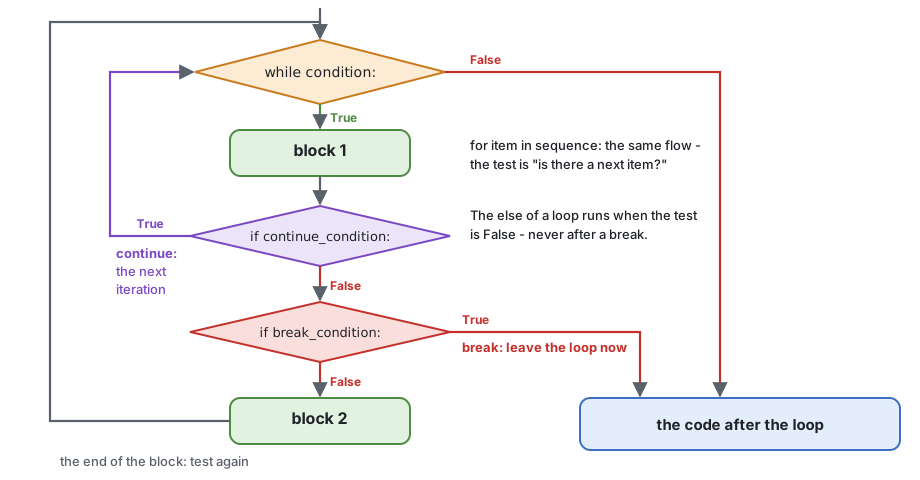
Follow the flow without running the code: what does this loop print?
for i in range(1, 6):
    if i == 2:
        continue
    if i == 4:
        break
print(i)1 and 3. At 2, continue goes back to the test, so 2 is not printed. At 4, break leaves the loop: 4 and 5 are never printed.
An annuity loan (session 1): the same payment every month. Each month, the interest is calculated on the balance, and the rest of the payment repays the principal.
data schedule;
    balance = 20000; monthly_rate = 6 / 12 / 100; n = 12;
    payment = balance * monthly_rate / (1 - (1 + monthly_rate) ** -n);
    do month = 1 to n;
        interest = balance * monthly_rate;
        principal = payment - interest;
        balance = balance - principal;
        output;
    end;
run;amount = 20000.0
monthly_rate = 6 / 12 / 100
n = 12
payment = amount * monthly_rate / (1 - (1 + monthly_rate) ** -n)
balance = amount
total_interest = 0.0
print(f"{'month':>5}{'payment':>11}{'interest':>11}{'principal':>11}{'balance':>12}")
for month in range(1, n + 1):
interest = balance * monthly_rate
principal = payment - interest
balance -= principal
total_interest += interest
print(f"{month:>5}{payment:>11,.2f}{interest:>11,.2f}{principal:>11,.2f}{balance:>12,.2f}")
print(f"total interest: {total_interest:,.2f}")(The last balance can show -0.00: a float rounding error of a fraction of a cent, session 1, section 14.)
Optional
Not needed for the tasks, the homework or the next sessions - read it when you have time.
The classic "guess the number" game - "too high", "too low", until it is right - is also a real method for finding a number that you cannot calculate directly. Which yearly rate gives a payment of exactly 400 EUR on 20 000 EUR for 5 years? The payment grows with the rate, so: try the middle of the interval, and keep the half where the answer must be (bisection):
amount = 20000.0
months = 60
target_payment = 400.0

low, high = 0.0, 30.0              # the yearly rate is somewhere in 0% ... 30%
tries = 0

while high - low > 0.00001:
    rate = (low + high) / 2        # guess: the middle
    r = rate / 12 / 100
    payment = amount * r / (1 - (1 + r) ** -months)
    if payment > target_payment:   # too high: the rate must be lower
        high = rate
    else:                          # too low: the rate must be higher
        low = rate
    tries += 1

print(f"rate {rate:.4f}% after {tries} tries")Each try halves the interval, so after 22 tries it is smaller than 0.00001%. The same idea finds the effective interest rate (the APR) of a loan with fees, or the internal rate of return (IRR) of a cash flow.
Open your copy of the Homework repository in VS Code (before the session: get the new tasks) and run the tasks from the terminal, in the repository root:
python 02-conditions-and-loops/practice/task1-predict-logic.py| Task | File | What you do |
|---|---|---|
| 1 | task1-predict-logic.py | Predict the result of 14 comparisons and logical expressions, then check |
| 2 | task2-buckets.py | The days-past-due bucket and the sign of a change, with if / elif / else |
| 3 | task3-stage-and-leap-year.py | The IFRS 9 stage with and / or; leap years |
| 4 | task4-match.py | Product groups and a currency converter with match |
| 5 | task5-loans-file.py | Loop over loans.csv: counts, sums, the largest loan, the first stage 3 loan |
| 6 | task6-while.py | Months to repay a loan with while; a text bar chart with for |
In task1-predict-logic.py, replace each "?" with your prediction before you run the file.
Help: what the tasks use from later sessions
TODO, not FAIL - and so does a "?" that you leave in a predict task. The parts marked optional below show details of Python that you will not need for your work with data.and and or work inside (section 3, "and and or return one of their operands"): 0 or "n/a", "" or None, 5 and 0 and True or 1 / 0. They are optional - in pandas you combine conditions with & and | instead (sessions 14 - 15). And "3" == 3 is False: == between a string and a number is allowed, and different types are never equal; only <, >, <=, >= stop with a TypeError.year % 4 == 0, year % 100 != 0 and year % 400 == 0 - "divides by 4 and not by 100, or divides by 400". Put brackets around the and part.largest_loan_id) and the homework, part 3: section 12, "Accumulators", keeps only the largest value. Here you need its loan id too: before the loop, two names - largest_outstanding = 0.0 and largest_loan_id = None; in the loop, when a loan is larger, change both (in the homework also the third one, the days past due).balance is negative - the last payment was only payment + balance. So all the payments together are payment * months + balance, and the interest is that minus amount.for days_past_due in [0, 1, 30, ...]: or for old, new in [(1000.0, 1200.0), ...]: (section 12, "Two names at once"). They only try your code on a few values - write your code inside, do not change the loop.break at the first stage == "3". Or keep the line as one list, fields = line.strip().split(","): then fields[0] is the loan id and fields[10] the stage (the positions are counted from 0, session 3).stage_counts holds pairs; loop over it with two names, for stage, count in stage_counts:, and add one line to chart in each iteration (chart += ...). "#" * 5 is "#####" (session 1).report with += and f-strings with widths, as in section 15: f"{'current':<8}{current_count:>6}", :>18,.2f, and :>8.1% for a percent (session 1, section 13).FAIL: the check compares the whole text, so one space more or less is a FAIL. print(report), then compare the got: and expected: lines under the FAIL character by character - one line of the report at a time.| Topic | Remember |
|---|---|
| Truth | 0, 0.0, "", None, empty collections are false; everything else is true |
| Comparisons | < <= > >= == !=, in, is None; never compare a str with a number - "3" == 3 is False; strings compare letter by letter |
| Logic | and, or, not; Python stops as soon as it knows; x or default replaces also 0 |
if | if / elif / else: the first true condition wins - like CASE WHEN; test only one bound of each range |
| Expressions | a if condition else b; statements do, expressions give a value |
match | one value against fixed cases; | for "or", case _: for the rest; guards with if |
while | while a condition is true; something in the block must change it |
for | each item of a sequence: a string, a list, range, the lines of a file; range(1, 13) is 1 ... 12 |
break / continue | leave the loop / go to the next iteration; while True + break = do until; a flag for "not found" |
02-conditions-and-loops/homework.py (in the homework repository): a report of days past due from loans.csv - the number of loans and the outstanding amount in each bucket, the shares, and the largest late loan. Every check must print OK.calculator.py asks for the amount, the yearly rate and the years with input(), asks again while a value is not valid (the amount must be more than 0, the rate between 0 and 50, the years between 1 and 30), and prints the repayment schedule of section 15. Add a menu with match: 1 - the schedule, 2 - only the total interest, 3 - quit; repeat until the user chooses 3.02-conditions-and-loops/notebook.ipynb - short extra tasks on the topics of today in a Jupyter notebook, each with a check cell. Open it in VS Code and select the .venv kernel.if, for, range, break, continue, else on loops, pass, match)match: PEP 636 - the pattern matching tutorialfor loops, while loopsNext session: lists, tuples and sets - indexing from 0, slices, the methods of list, tuples as records, and the SQL UNION / INTERSECT / EXCEPT with sets.