English
Appearance
Today you will learn to:
pip and requirements.txt;print();int, float, str, bool, None;math module;Decimal, and round them the way SAS and SQL do.From SQL to Python - the same question, two ways:
SELECT SUM(outstanding) FROM loans WHERE stage = 3;import pandas as pd
loans = pd.read_csv("data/loans.csv")
print(loans.loc[loans["stage"] == 3, "outstanding"].sum())By session 16 you will write code like this every day. Today we start from the pieces it is made of: values, types, variables and operators.
Iva Popova - LinkedIn, e-mail iva.popova@sciscend.com. Her teaching and professional experience: The trainer (also in the side menu).
A smooth move to Python as the main tool for the same daily work that you now do in SQL and SAS: reporting, modelling and ad-hoc analysis. You already know how to work with data - joins, groups, filters, formats. In this course you learn the same things in a new language, and what Python adds on top: automation of files and reports, a huge choice of free libraries, and notebooks that mix code, tables, charts and text.
16 sessions of 4 academic hours. The full plan is on the Agenda page:
| Sessions | Topic |
|---|---|
| 1 - 2 | The language: types, variables, operators, conditions and loops |
| 3 - 6 | Collections: lists, tuples, sets, dictionaries; functions |
| 7 - 9 | Text, regular expressions, errors and files |
| 10 - 12 | Modules, Git, classes and objects |
| 13 | Databases: SQL from Python |
| 14 - 16 | NumPy and pandas: the Python version of your SQL and SAS work; the final project |
OK or FAIL, and a homework. We review the homework at the start of the next session.CASE WHEN, GROUP BY, JOIN, the DATA step, PROC SORT, PROC MEANS, formats, macros.| What | Where |
|---|---|
| The lectures (this site) | https://ivapopova-courses.github.io/Python-Data-Analysts-UniCredit-Slides/ |
| Practice tasks and homework | https://github.com/ivapopova-courses/Python-Data-Analysts-UniCredit-Homework |
| The code written in class | https://github.com/ivapopova-courses/Python-Data-Analysts-UniCredit-Labs |
| Step-by-step animations | Animations |
| The final project | Final project |
Python is a general-purpose programming language: free, open source, and one of the most used languages in the world. It is used for:
For an analyst, the main reason is the libraries: pandas and NumPy for tables and numbers, matplotlib for charts, statsmodels and scikit-learn for models, openpyxl for Excel, SQLAlchemy for databases. They are all free.
| SQL | SAS | Python | |
|---|---|---|---|
| What it is | a query language of the database | a commercial system for data and statistics | a general-purpose language with libraries for data |
| Where the data is | in the database | SAS data sets (.sas7bdat), libraries | in memory: lists, dictionaries, pandas DataFrames; files and databases |
| Typical work | select, join, group, filter | DATA step, PROCs, formats, macros | everything above, plus automation, charts, models |
| Price | part of the database | licence | free |
You will not stop using SQL. The best place to filter and join big tables is still the database; Python sends the SQL query and works with the result (session 13). Python replaces mostly the SAS part of the work - and adds what neither SQL nor SAS does well.
How SAS ideas map to Python (most of them come in the later sessions):
| SAS | Python |
|---|---|
| DATA step | a loop over rows (sessions 2 - 6), or pandas (sessions 14 - 16) |
PROC SORT | sorted(), DataFrame.sort_values() |
PROC MEANS, PROC SUMMARY | sum(), statistics, DataFrame.groupby().agg() |
PROC FREQ | collections.Counter, value_counts(), pd.crosstab() |
PROC TRANSPOSE | DataFrame.pivot(), melt() |
formats (COMMA12.2, PERCENT8.2) | f-strings: f"{x:,.2f}", f"{x:.2%}" - section 13 |
macros, %LET | functions (session 4), variables |
LIBNAME | file paths, database connections |
| the SAS log | the output in the terminal; error messages (tracebacks) |
| an Enterprise Guide project | a Jupyter notebook - section 7 |
Python comes with a large standard library: modules for files, CSV, JSON, dates, exact decimal numbers, regular expressions, SQLite databases, statistics, and much more. You only import them. Everything else is on PyPI, the Python Package Index (https://pypi.org): hundreds of thousands of free packages, installed with pip (section 4).
import statistics

rates = [8.83, 5.44, 4.79, 8.35]
print(statistics.mean(rates))
print(statistics.median(rates))The design rules of the language, written by Tim Peters. Run import this to see all 19:
import thisThe ones you will feel most in this course:
"5" to 5 for you (SAS does, with a note in the log) - you say what you want (section 12).print "hello" without brackets), it is old.Python is a language; a program that runs Python code is an implementation:
| Implementation | What it is |
|---|---|
| CPython | the standard one, written in C - the Python you install from python.org. When people say "Python", they mean CPython |
| PyPy | a faster implementation with a JIT compiler, for long-running pure-Python code |
| Pyodide | CPython compiled for the browser (WebAssembly) - it runs the examples on this site |
| MicroPython | a small Python for microcontrollers |
| Cython | not an implementation, but a compiler: Python-like code to C, for fast extensions. Parts of pandas are written in it |
Older names you may still meet: Jython (Python on Java) and IronPython (Python on .NET) are rarely used today.
The processor understands only machine code: very simple instructions in binary. A program in a "human" language must be translated first. There are two classic ways:
.exe). Like a translator who translates the whole book, and then you read it. Languages: C, C++, Rust; Java and C# compile to bytecode for a virtual machine..exe. Like an interpreter at a meeting, sentence by sentence. Languages: Python, JavaScript, PHP, Ruby. SAS works in a similar way: it compiles and runs one DATA step or PROC at a time.Python is an interpreted language, with a small compiler inside:
SyntaxError stops everything here, before the first line runs;__pycache__ folders with .pyc files - you will see one in the Homework repository);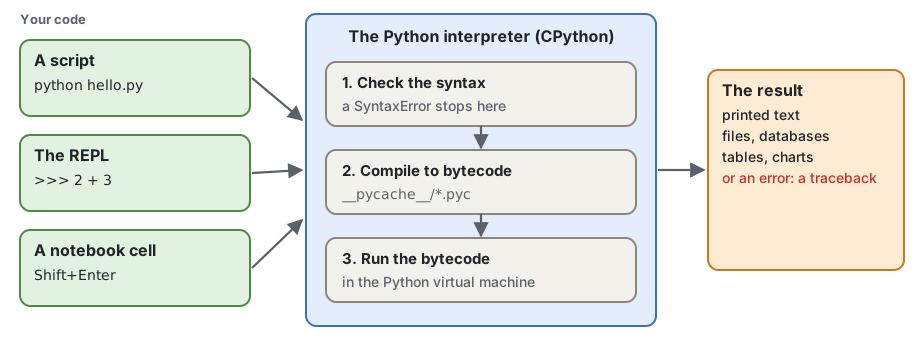
You can see the bytecode with the dis module (the instructions differ a little between Python versions):
import dis

dis.dis("interest = outstanding * rate / 100")Advanced: faster Python
Python 3.13 added two experiments: a JIT compiler (it turns hot bytecode into machine code) and a free-threaded build without the GIL (Python code can run on several processor cores at once). Both are off by default. In 3.14 the free-threaded build is officially supported, and the Windows and macOS installers include the JIT (still off by default). For data work, speed comes from the libraries: pandas and NumPy do the heavy work in C.
A short video about compilers and interpreters: How do computers read code? (Frame of Essence). Hello World in hundreds of languages: rosettacode.org.
You installed the tools before the course - see Set up Python on your computer. This section explains what each step does, so you can do it again for a new project.
C:\Users\<you>\AppData\Local\Programs\Python\Python3xx\.Check it in a terminal:
py --version          # the Python launcher
python --version # if Python is in PATHpython3 --version"python" opens the Microsoft Store?
On Windows, python can start the Microsoft Store instead of your Python. Use py, or switch off the store aliases: Settings > Apps > Advanced app settings > App execution aliases, turn off python.exe and python3.exe. If the command is not found at all, Python is not in PATH: How to add Python to PATH.
You can have several versions side by side. On Windows the Python launcherpy chooses one:
py --list            # the installed versions (also: py -0)
py -3.12 --version   # run a given version
py -3.12 -m venv .venv   # a virtual environment with Python 3.12
On macOS and Linux, the tools for this are pyenv and uv (uv python install 3.12). On Windows, python.org now offers the Python install manager first: with it, py install 3.13 installs a version and py list shows the installed ones. The classic installer of each version (with Add python.exe to PATH) is still on the Windows downloads page.
A package (or library) is code someone wrote for others to use: pandas, NumPy, matplotlib. pip installs packages from PyPI:
| Command | What it does |
|---|---|
pip install pandas | installs the latest version that works with your Python |
pip install "pandas>=2.2" | a version 2.2 or newer |
pip install --upgrade pandas | installs a newer version |
pip uninstall pandas | removes it |
pip list | the installed packages |
pip show pandas | the version, where it is, what it needs |
pip freeze | the installed packages with their exact versions |
pip install -r requirements.txt | everything listed in the file |
pip help | all commands (pip documentation) |
python -m pip
python -m pip install ... is the same as pip install ..., but it is sure to use the pip of this python. Use it when you are not sure which Python is active.
Why. Each project needs its own packages, often in a given version: last year's report needs pandas 2.2, a new model needs pandas 3. If all projects install into the one Python of the computer, a new install can break an old project (this is called dependency hell).
What. A virtual environment (venv) is a folder in the project - usually .venv - with its own copy of python and its own packages. Packages installed while it is active go there, and only there.
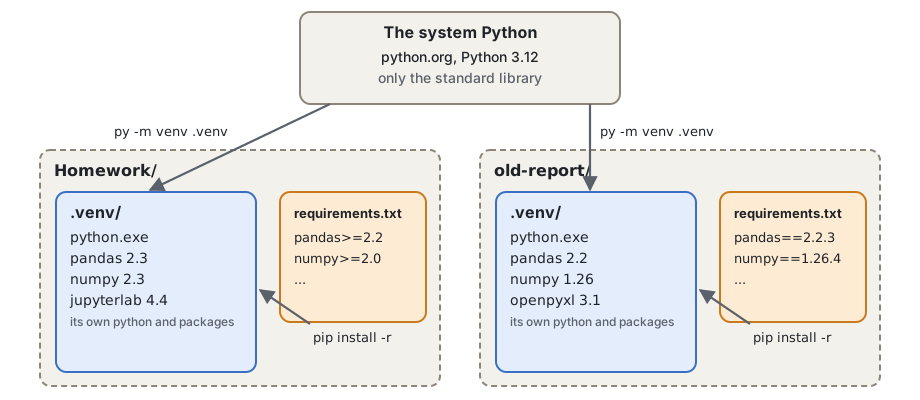
The venv module comes with Python. Once per project, in the project folder:
py -m venv .venvpython3 -m venv .venvEvery time you work on the project, activate it:
.venv\Scripts\activate            # PowerShell and cmd
source .venv/Scripts/activate # only in Git Bashsource .venv/bin/activateThe prompt starts with (.venv). Now python and pip are the ones in .venv:
where.exe python   # the first line must end with .venv\Scripts\python.exe
deactivate # leave the virtual environmentwhich python # must end with .venv/bin/python
deactivate # leave the virtual environmentPowerShell: "running scripts is disabled on this system"
PowerShell may refuse to run Activate.ps1. Allow it for the current terminal only, then activate again:
Set-ExecutionPolicy -ExecutionPolicy RemoteSigned -Scope Process
.venv\Scripts\activate
Or use the Command Prompt (cmd): in VS Code, the v next to the + of the terminal panel opens a new terminal of another type.
requirements.txt: the list of packages A project lists its packages in requirements.txt, so anyone can rebuild the same environment. The Homework repository has one:
jupyterlab>=4.2
ipykernel>=6.29
numpy>=2.0
pandas>=2.2
openpyxl>=3.1
sqlalchemy>=2.0
matplotlib>=3.9pip install -r requirements.txt # install all of them
pip freeze > requirements.txt # or: write down the exact versions you have nowpip freeze gives exact versions (pandas==3.1.0): use it when a report must give the same result next year, on another computer. This is called freezing the dependencies - it avoids "but it works on my machine".
pandas 2 or pandas 3?
>= means "this version or newer", so pandas>=2.2 installs the newest pandas - pandas 3 today (3.1 in October 2026). The site runs pandas 3 too, so this course uses pandas 3; where pandas 2.2 behaves differently (the type of text columns, copies of a DataFrame), sessions 14 - 16 say so. Check yours with pip show pandas.
What the packages of this course are for:
| Package | What for | Sessions |
|---|---|---|
numpy | fast arrays and calculations with numbers | 14 - 16 |
pandas | tables (DataFrame): read, filter, group, join, write | 14 - 16 (a preview today) |
matplotlib | charts | 16 (a preview in section 7) |
jupyterlab, ipykernel | Jupyter notebooks, in the browser and in VS Code | all |
openpyxl | read and write Excel files | 9, 14 - 16 |
sqlalchemy | connect pandas to a database | 13, 16 |
seaborn (nicer statistical charts, built on matplotlib) is not in the list - install it with pip if you want to try it.
A script that needs a package which is not installed stops at the import:
> python simple_plot.py
Traceback (most recent call last):
  File "C:\course\simple_plot.py", line 1, in <module>
    import matplotlib.pyplot as plt
ModuleNotFoundError: No module named 'matplotlib'
The fix is not pip install into the system Python, but: activate the project's venv (or create it), pip install matplotlib there, and run the script again.
| Tool | What it is |
|---|---|
| uv | a new, very fast tool: Python versions, virtual environments and packages in one (uv venv, uv pip install) |
| Poetry, pipenv | manage a project's packages and venv together, with a lock file of exact versions |
| conda | packages and environments, also for non-Python software; comes with Anaconda and Miniconda |
Anaconda in a company
The Anaconda Distribution and its default package channel need a paid licence in organisations with more than 200 employees. This course uses the standard python.org Python with venv and pip, which is free for everyone.
| Part | Where | What for |
|---|---|---|
| Activity Bar | far left | Explorer, Search, Source Control (Git), Extensions |
| Side Bar | left | the files of the folder (Explorer) |
| Editor | middle | your files, in tabs |
| Panel | bottom | the Terminal, Problems, Output |
| Status Bar | very bottom | the active Python (for example 3.12.7 ('.venv')) - click it to change it |
Read more: User interface.
Install these from the Extensions view (Ctrl+Shift+X); both are from Microsoft:
Later lectures work with data files. These extensions help you look at them without leaving VS Code:
.xlsx files inside VS Code.You do not have to search for them one by one: the Homework folder lists them all in .vscode/extensions.json, and VS Code offers to install them when you open the folder. How, and how to use the same list in your own projects: VS Code extensions.
A colour theme: Ctrl+K Ctrl+T (Themes).
Always open the folder of a project, not single files: File > Open Folder, or right-click the folder in Windows Explorer > Open with Code. The folder is your workspace: VS Code remembers the open files, and you can keep settings for this folder only in .vscode/settings.json (Ctrl+Shift+P > Preferences: Open Workspace Settings). Read more: What is a VS Code workspace?
For this course, the folders are:
course/
    Python-Data-Analysts-UniCredit-Homework/   your work: tasks and homework
Python-Data-Analysts-UniCredit-Labs/ the code from the lessons (only git pull)Ctrl+Shift+P > Python: Select Interpreter > the one in .venv. VS Code then runs your files with it, and new terminals activate the venv by themselves.
In the Explorer, right-click the folder > New File, name it hello.py.
Write:
my_name = "Iva"  # put your name
print("Hello, " + my_name)
Run it, in one of these ways:
python hello.py;The output appears in the Terminal panel.
| Keys | Action |
|---|---|
Ctrl+Shift+P | the Command Palette: every command, by name |
Ctrl+P | open a file by name |
Ctrl+S | save |
Ctrl+Z / Ctrl+Y | undo / redo |
Ctrl+` | show / hide the terminal |
Ctrl+B | show / hide the Side Bar |
Ctrl+J | show / hide the Panel |
Ctrl+/ | comment / uncomment the selected lines |
Ctrl+D | select the next match of the selection (edit several places at once) |
Alt+Up / Alt+Down | move the line up / down |
Shift+Enter | run the selected lines in a Python terminal |
F5 | run with the debugger |
In the terminal, cls (cmd) or clear clears the screen. All shortcuts: keyboard reference sheets.
The Source Control view (Ctrl+Shift+G) shows the changed files; type a message, Commit, then Sync (push). The commands for the Homework repository are in How to use these pages; Git itself is the topic of session 10.
A script is a .py file. Run it from a terminal, in the folder of the project:
python hello.py                                    # a file in this folder
python 01-intro-syntax-types/practice/task1-first-values.py
python -c "print(2 ** 10)"                         # one line of code
python -m pip --version # run a modulepython (or py) without a file starts the interactive Python - the REPL (read, evaluate, print, loop). Type a line, press Enter, see the result. The prompt is >>>; ... means "continue the statement":
>>> 1044231.30 * 8.83 / 100
92205.62379000001
>>> rate = 8.83
>>> rate * 2
17.66
>>> exit()
You leave with exit(), or Ctrl+Z then Enter (Windows), Ctrl+D (macOS, Linux). Since Python 3.13 the REPL has colours, editing of whole blocks, and exit works without the brackets.
The REPL is good for a quick try. For anything you want to keep, write a file or a notebook.
A notebook (.ipynb file) is a document of cells. A code cell runs, and its result - a number, a table, a chart - appears right under it. Text cells explain the work. It is the closest thing in Python to an Enterprise Guide project or a SQL worksheet: ideal for exploring data and showing results.
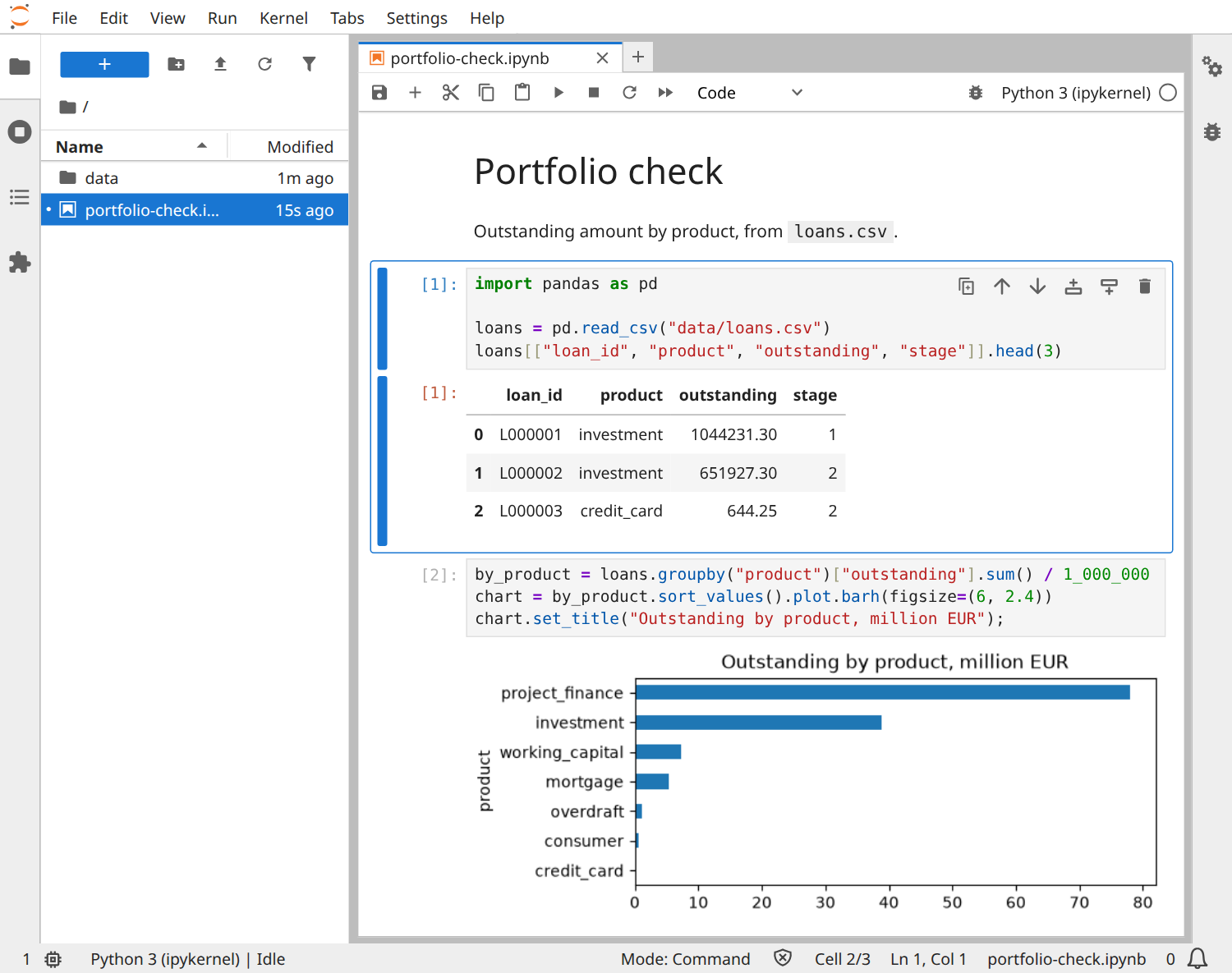
In the picture (JupyterLab in the browser):
data folder;[1] - a code cell and its output, a table; the blue bar marks the selected cell;[2] - a code cell whose output is a chart;Python 3 (ipykernel), the Python that runs the code; Idle in the status bar means that it waits for work.Project Jupyter is the free, open-source project behind notebooks. The name comes from three languages: Julia, Python and R - a notebook can run other languages too, but we use only Python.
The notebook is the file; several programs can open the same .ipynb:
| Program | Where it runs |
|---|---|
| JupyterLab | in the browser, started from your computer (jupyter lab) |
| VS Code | inside the editor - what we use in this course |
| cloud data platforms (for example Google Colab, Databricks) | on a server, opened in the browser |
An .ipynb file is text (JSON) that holds the code, the text and the last outputs. So a notebook keeps its tables and charts when you close it, and GitHub shows it as a page, with the results, without running it.
Notebooks are not the right tool for a job that runs every month without a person, or for code that many reports share - for that you write a script or a module (see "Script or notebook?" at the end of this section, and lecture 10).
Try it without installing
jupyter.org/try opens JupyterLab in the browser, with nothing to install. Use it only with made-up data, never with the bank's data.
| Cell type | What it holds |
|---|---|
| Code | Python code; the output is shown below the cell |
| Markdown | text with headings, lists, tables, links (Markdown syntax); HTML works too |
| Raw | text that is not run or formatted |
The kernel is the Python process behind the notebook. It keeps the variables between cells: a cell can use a variable from a cell above. (On this site, every example runs on its own - in a notebook they do not.)
[3] next to a cell is the order in which the cells ran.A notebook needs two packages in the project's venv: ipykernel (runs the notebook with the venv's Python) and jupyterlab (notebooks in the browser). Both are in requirements.txt (section 4) - if you installed it, you have them. In a new project, with the venv active:
pip install jupyterlab ipykernel
jupyter lab --version     # check: prints the version
In VS Code you also need the Jupyter extension (section 5).
"Running cells requires the ipykernel package"
VS Code shows this when the selected kernel has no ipykernel - usually the system Python instead of the .venv. Select the .venv kernel, or click Install.
Ctrl+Shift+P > Create: New Jupyter Notebook (or a new file analysis.ipynb)..venv of the project.Shift+Enter runs it and goes to the next cell.Or in the browser: jupyter lab in the terminal (with the venv active) opens JupyterLab.
A cell with a chart - the same works in a notebook:
import pandas as pd
import matplotlib.pyplot as plt

loans = pd.read_csv("data/loans.csv")
by_product = loans.groupby("product")["outstanding"].sum() / 1_000_000
by_product.sort_values().plot.barh(title="Outstanding by product, million EUR")
plt.tight_layout()
plt.show()A cell is in edit mode (you type in it) or in command mode (you work with whole cells). Esc goes to command mode, Enter to edit mode.
| Mode | Keys | Action |
|---|---|---|
| both | Shift+Enter | run the cell, go to the next one |
| both | Ctrl+Enter | run the cell, stay on it |
| both | Ctrl+S | save |
| command | A / B | insert a cell above / below |
| command | M / Y | change the cell to Markdown / code |
| command | D D | delete the cell |
| command | Z | undo the delete |
| command | C / X / V | copy / cut / paste cells |
| edit | Tab | completion, or indent |
| edit | Shift+Tab | help for the function (JupyterLab) |
| edit | Ctrl+/ | comment the lines |
All commands: the Command Palette - Ctrl+Shift+P in VS Code, Ctrl+Shift+C in JupyterLab. All shortcuts: Help > Show Keyboard Shortcuts (JupyterLab).
Lines that start with % (one line) or %% (the whole cell) are commands of the notebook, not Python (IPython magics):
| Magic | What it does |
|---|---|
%pip install seaborn | installs a package into the kernel's environment |
%timeit sum(range(1000)) | measures how long a line takes |
%%time | measures the whole cell |
%%html | the cell is HTML (for example an embedded video) |
!dir (Windows), !ls | runs a command of the system |
| Notebook | Script (.py) |
|---|---|
| exploring data, trying ideas | a job that runs again and again |
| results with tables and charts next to the code | runs from the terminal or a scheduler |
| sharing an analysis with text | easy to review and version in Git |
Often both: explore in a notebook, then move the finished code into a script.
A program is a list of statements, run from top to bottom. In Python:
; as in SQL and SAS (you can put ; between two statements on one line, but nobody does);(, [ or { is open (or after a \ at the end of the line - avoid it);42, rate, outstanding * rate / 100.outstanding = 1044231.30
rate = 8.83
yearly_interest = (outstanding
* rate
/ 100)
print(yearly_interest)SAS has do; ... end;, SQL has BEGIN ... END. In Python a block - the lines that belong to an if, a loop or a function - is the lines indented under a line that ends with :. The indentation is not decoration: it is the syntax.
The same task - the sum and the product of four numbers - in SAS and in Python:
data _null_;
    total = 0;
    product = 1;
    do i = 1 to 4;
        total = total + i;
        product = product * i;
    end;
    put total= product=;
run;numbers = [1, 2, 3, 4]
product = 1
for i in numbers:
product = product * i # inside the loop: indented
total = sum(numbers)
print(total, product)(Loops are the topic of session 2.) More side-by-side examples of languages: rosettacode.org.
Rules:
Tab in a .py file;TabError: inconsistent use of tabs and spaces in indentation.An indentation where none is expected:
loan_id = "L000001"
    stage = 1
print(loan_id, stage)IndentationError: unexpected indent - and nothing runs, not even the first line (the syntax is checked before the program starts, section 3).
A wrong indentation can also give no error at all - only a wrong result. Find the bug:
days_past_due = 120

if days_past_due > 90:
    print("*" * 5)
    print("Non-performing")
else:
    print("-" * 5)
print("Performing")print("Performing") is not indented, so it is not part of the else block: it runs always, also for a loan 120 days past due. It needs 4 spaces in front.
Everything after # up to the end of the line is a comment: Python ignores it.
# The report date of the sample data
report_date = "2026-09-30"

stage = 3          # 1, 2 or 3 (IFRS 9)
# print("not run")
print(report_date, stage)Comments are for people:
Ctrl+/ in VS Code).SAS has /* ... */ and * ... ;, SQL has -- and /* ... */. Python has only # (a text in triple quotes is sometimes used for longer notes - more in session 4). Style: PEP 8 - Comments.
print(): show values print() writes values to the screen, separated by spaces, and ends with a new line. Two options change that: sep (the separator) and end (what comes at the end).
print("L000001", "investment", 1044231.30)
print("L000001", "investment", 1044231.30, sep=";")
print("2026", "09", "30", sep="-")

print("Loading", end="")
print("...", end="")
print(" done")
print()            # an empty line
print("end")input(): ask the user input() shows a message, waits for the user to type a line and press Enter, and returns what was typed - always as text (str), even when the user types a number. Convert it yourself (section 12):
amount_text = input("Amount: ")          # the user types 2500
print(type(amount_text))                 # <class 'str'>
amount = float(amount_text)
print("Amount with 10% fee:", amount * 1.1)
input() does not work on this site - try it in VS Code (python file.py) or in a notebook. In analysis work you seldom need it: the data comes from files and databases.
Inside a string, a backslash \ starts an escape sequence - a character you cannot type directly:
| Sequence | Result |
|---|---|
\n | a new line |
\t | a tab |
\' | ' |
\" | " |
\\ | one \ |
print("line 1\nline 2")
print("L000001\tinvestment\t1044231.30")
print('Client\'s rating')
print("Client's rating")          # or simply use the other quotes
print("C:\\data\\loans.csv")Windows paths are a trap: in "C:\new\table.csv", \n is a new line and \t is a tab. Write the path with \\, with / (Python accepts it on Windows too), or as a raw string r"...", where \ is just a character:
print("C:\new\table.csv")         # wrong
print(r"C:\new\table.csv")        # right: a raw string
print("C:/new/table.csv") # right: forward slashesAll escape sequences: String and bytes literals. Since Python 3.12 an unknown escape like "\d" gives a SyntaxWarning.
Every value in Python has a type. The type decides what the value can do: 1 + 2 adds numbers, "1" + "2" joins texts.
print(1 + 2)
print("1" + "2")
print(3 * 4)
print(3 * "4")
print(True + True)The basic types:
| Type | Values | SQL | SAS |
|---|---|---|---|
int | whole numbers: 42, -7, 1_000_000 | INTEGER, BIGINT | numeric |
float | numbers with a fraction: 8.83, 0.0005, 1.5e-3 | FLOAT, DOUBLE | numeric (it is a float) |
str | text: "EUR", 'L000001' | VARCHAR, CHAR | character |
bool | True, False | BOOLEAN, BIT | 1 / 0 |
NoneType | None - "no value" | NULL | missing (., " ") |
type() gives the type of a value:
for value in [42, 8.83, "EUR", True, None]:
print(repr(value), type(value).__name__)In Python every value - a number, a text, True, even a function - is an object: a piece of memory that knows its type and its value. That is why values have methods (functions that belong to them):
print(type(1))
print(type(1.0004))
print(type("double quotes"), type('single quotes'), type("""triple quotes"""))
print(type([]))
print((8.83).is_integer())
print("eur".upper())int - whole numbers print(42, +42, -42)
print(1_000_000 + 2_000_000) # _ only makes long numbers readable
print(2 ** 100) # no limit on the sizeA Python int has no maximum: it grows as needed. (SQL INTEGER stops at about 2.1 billion, BIGINT at 9.2 * 10**18.)
float - numbers with a fraction print(3.1234, -0.255)
print(.44, -.55) # the 0 in front may be left out
print(1.5e-3) # scientific notation: 1.5 * 10**-3
print(0.00005) # very small numbers are shown that way
print(1044231.30) # the trailing 0 is not keptA float is a binary floating-point number of 64 bits (IEEE 754 "double") - exactly the same as a SAS numeric value. It has about 15 - 17 significant digits. Most decimal fractions cannot be stored exactly - section 14 shows what that means for money.
Python also has complex numbers (3 + 4j), for engineering and science; you will not need them in this course.
str - text A string is a sequence of characters (Unicode - Cyrillic works too), in single or double quotes - there is no difference. Triple quotes """...""" or '''...''' allow several lines:
product = "investment"
region = 'Пловдив'
note = """The loan was restructured
in March 2026."""
print(product, region)
print(note)
print(len(region)) # the number of charactersA string in single quotes cannot continue on the next line:
note = 'The loan was restructured
in March 2026.'bool - True and False The result of a comparison is a bool. Note the capital letters: True, False.
days_past_due = 120
is_late = days_past_due > 0
is_non_performing = days_past_due > 90
print(is_late, is_non_performing)
print(type(is_late))A bool is a kind of int: True is 1 and False is 0. So you can count with it - like sum(dpd > 90) in SAS SQL:
print(True + True + False)
print(sum([120 > 90, 35 > 90, 200 > 90])) # how many are over 90None - no value None means "no value (yet)" - like NULL in SQL and a missing value in SAS.
industry = None             # retail clients have no industry code
print(industry)
print(industry is None)     # the right way to test for None
print(type(industry))None is not NULL
In SQL, NULL = NULL is not true, and you must write IS NULL. In SAS, a missing . is smaller than every number, so if x < 0 is true for missing values. In Python, None == None is True, and None < 0 is an error. Test with x is None. (pandas has its own missing values, NaN and NA - session 14.)
A variable is a name for a value. The assignment = evaluates the expression on the right and gives the result a name:
loan_id = "L000001"
outstanding = 1044231.30
rate = 8.83

interest = outstanding * rate / 100
print(loan_id, interest)LENGTH or a SQL DECLARE).outstanding = 1044231.30
print(outstandng)In many languages a variable is a box that holds a value. In Python it is more exact to say: the value is an object in memory, and the variable is a name (a label) bound to that object. Assignment binds a name to an object; id() gives the identity of the object (in CPython, its memory address):
x = 5
y = x            # y is bound to the same object as x
print(id(x), id(y))

x = 3            # x is bound to a new object; y still to 5
print(x, y)
print(id(x), id(y))A new assignment does not change the old object: it moves the name to a new one. An object that has no name any more is deleted automatically by the garbage collector - you never free memory yourself.
Animation
Names and objects:1. A name and an object, 2. A new value, 3. Two names, one object
The type belongs to the object, not to the name. The same name can be bound to an int now and to a str later:
value = 42
print(type(value))
value = "42"
print(type(value))In SAS, the type of a variable is fixed in the DATA step; in SQL, the type of a column is fixed in the table. Python checks types only when the code runs - a mistake shows up as a TypeError at that line. Keep one type per name: it makes the code easier to read. (Type hints, like rate: float = 8.83, document the intended type - session 4.)
Animation
Names and objects: 5. Types belong to objects
Otherwise: SyntaxError.
_; no spaces, no -;if, for, class, None, True, ...);rate, Rate and RATE are three different names - not like SAS and SQL, where case does not matter.import keyword
print(keyword.kwlist) # the words you cannot use as namesfirst_name = "Ada"
print(first_Name) # NameError: a different namesur-name = "Byron" # SyntaxError: "-" is minusPEP 8 is the style guide of Python. For names:
| What | Style | Example |
|---|---|---|
| variables, functions | snake_case: small letters, words joined with _ | days_past_due, client_since |
| constants (values that do not change) | UPPER_SNAKE_CASE | REPORT_DATE = "2026-09-30" |
| classes (session 11) | CapWords | Loan, RatingScale |
outstanding, not x or data2.is_late, has_collateral.camelCase (daysPastDue) is used only in old code that already has it.UPPER_CASE only tells other people "do not change this".# several names at once
loan_id, stage = "L000001", 1
print(loan_id, stage)
# the same value for several names
x = y = 0
print(x, y)
# swap two values - no helper variable needed
a, b = 10, 20
a, b = b, a
print(a, b)Augmented assignment changes a variable using its old value:
| Statement | Means |
|---|---|
total += 100 | total = total + 100 |
total -= 100 | total = total - 100 |
total *= 2 | total = total * 2 |
total /= 2 | total = total / 2 |
total //= 2, total %= 2, total **= 2 | the same with //, %, ** |
total = 0
total += 1044231.30
total += 651927.30
total += 644.25
print(total)del name removes a name (the object goes away when no name points to it):
temp = 42
del temp
print(temp) # NameErrorAnimation
Names and objects:4. x = x + 1, 6. Several names at once, 7. is and == (advanced)
| Operator | Meaning | Example | Result |
|---|---|---|---|
+ | add | 7 + 2 | 9 |
- | subtract | 7 - 2 | 5 |
* | multiply | 7 * 2 | 14 |
/ | divide - always a float | 7 / 2 | 3.5 |
// | floor division: the whole part, rounded down | 7 // 2 | 3 |
% | modulo: the remainder | 7 % 2 | 1 |
** | power | 7 ** 2 | 49 |
-x | minus | -7 | -7 |
print(5 - 3, 5 * 3, 5 / 3, 5 // 3, 5 % 3, 5 ** 3)
print(6 / 3)              # a float, even when it divides exactly
print(type(6 / 3))
print(2 + 3.0) # int and float give a float// and % together split a number into units. 125 days past due are how many months of 30 days, and how many days more?
days_past_due = 125
months = days_past_due // 30
days = days_past_due % 30
print(months, "months and", days, "days")
print(divmod(days_past_due, 30)) # both at oncePython 2 division
In Python 2, 5 / 3 was 1 (like // now). In Python 3 it is 1.6666666666666667. If old code divides whole numbers, check which one it meant.
// and % with negative numbers// rounds down, towards minus infinity: -7 // 2 is -4, not -3, and -7 % 2 is 1. SAS INT() and int() in Python cut the fraction towards zero: int(-3.5) is -3. For negative values, check which one you need.
print(-7 // 2, -7 % 2, int(-7 / 2))As in mathematics and in SQL:
| Priority | Operators |
|---|---|
| 1 (first) | ( ) |
| 2 | ** |
| 3 | -x (minus) |
| 4 | *, /, //, % |
| 5 | +, - |
| 6 | comparisons: ==, !=, <, <=, >, >= |
| 7 | not |
| 8 | and |
| 9 (last) | or |
Operators of the same priority run from left to right - except **, which runs from right to left. When in doubt, add brackets: they also make the code easier to read.
print(1000 + 2000 * 0.05)       # 1100.0
print((1000 + 2000) * 0.05)     # 150.0
print(-2 ** 2)                  # -4: ** comes before the minus
print(2 ** 3 ** 2) # 512: 3 ** 2 firstAnimation
How an expression is evaluated:1. Precedence, 2. Brackets, 3. ** and minus, 4. // and %
| Python | SQL | SAS | Meaning |
|---|---|---|---|
== | = | =, EQ | equal |
!= | <>, != | ^=, NE | not equal |
<, <= | <, <= | <, <= (LT, LE) | less (or equal) |
>, >= | >, >= | >, >= (GT, GE) | greater (or equal) |
= gives a name, == compares. The result is a bool. Comparisons can be chained - like BETWEEN in SQL:
days_past_due = 45
print(days_past_due == 0)
print(days_past_due != 0)
print(30 < days_past_due <= 90)      # the same as 30 < dpd and dpd <= 90
print("EUR" == "eur") # texts: case mattersand, or and not combine conditions - in small letters, as words:
days_past_due = 45
rating = 10
print(days_past_due > 90 or rating == 10)     # stage 3?
print(days_past_due > 0 and rating < 5)
print(not days_past_due > 90)& and | are not and and or
In SAS, & and | mean AND and OR. In Python they are different (bit) operators. pandas uses them for conditions on whole columns (session 15) - but for single values, write and, or, not.
if with conditions, and the details of and / or, come in session 2.
Animation
How an expression is evaluated:5. Chained comparisons, 6. and / or
+ joins two strings (like || in SQL and SAS), and * repeats a string:
print("ala" + "bala")
print("1" + "2")
print("-" * 30)
print("ab" * 3)Python does not mix types for you - "apples with oranges" is an error:
print("Stage " + 3)print("ab" * "3")The fix is an explicit conversion, "Stage " + str(3) (section 12), or an f-string (section 13).
Animation
How an expression is evaluated: 7. Mixed types
Strings have many methods - functions you call with a dot after the value. A few, for a first look (session 7 has them all):
print("ada".capitalize())
print("alabala".count("a"))
print("Alabala".count("a"))        # "A" is not "a"
print("AlabAla".find("a"))          # the position of the first "a", from 0
print("alabala".replace("a", "o"))
print("L000001,C0080,investment".split(","))
print(" EUR ".strip())Reference: String methods.
Ready to use, without import:
print(abs(2 - 5))
print(max(1, 2, 3), min(1, 2, 3))
print(round(2.51), round(2.49))
print(round(8.8349, 2))
print(sum([1044231.30, 651927.30, 644.25]))
print(pow(2, 10))round() has a surprise for people from SAS and SQL - see section 14.
math module More functions are in the math module. Import it once, at the top of the file:
import math

print(math.sqrt(16))
print(math.pi)
print(math.floor(2.9), math.ceil(2.1))     # down, up
print(math.floor(-2.5), math.ceil(-2.5))
print(math.pow(2, 3))                      # always a float (2 ** 3 is an int)
print(math.log(100, 10), math.exp(1))The name of a type is also a function that converts a value to it:
| Function | Gives | Examples |
|---|---|---|
int(x) | an int | int("42") -> 42, int(3.99) -> 3 (cuts, does not round) |
float(x) | a float | float("8.83") -> 8.83, float(5) -> 5.0 |
str(x) | a str | str(1044231.3) -> "1044231.3" |
bool(x) | a bool | bool(0) -> False, bool("no") -> True |
Data from files, input(), Excel exports and the web often comes as text. A row of loans.csv, before any conversion, is only a string:
row = "L000002,C0132,investment,EUR,2019-04-16,2029-04-16,1977400.00,651927.30,5.44,35,2"
print(row.split(","))Each piece is a str. You cannot calculate with them before you convert them:
outstanding_text = "651927.30"
rate_text = "5.44"
days_text = "35"

outstanding = float(outstanding_text)
rate = float(rate_text)
days_past_due = int(days_text)

print(outstanding * rate / 100)
print(days_past_due > 30)What int() and float() accept, and what not:
print(int("42"), int(" 42 "), int("0042"), int("-7"), int("1_000"))
print(float("8.83"), float("1e3"), float(" 5 "))print(int("3.5")) # ValueError: not a whole number - use int(float("3.5"))print(float("1 044 231,30")) # ValueError: Bulgarian formatNumbers written the Bulgarian way - a space between the thousands, a comma for the fraction - must be cleaned first (more string methods in session 7):
text = "1 044 231,30"
clean = text.replace(" ", "").replace(",", ".")
print(clean, float(clean))SAS converts, Python does not
SAS converts "5" to 5 by itself and writes a NOTE to the log. Python never converts text to numbers by itself: "5" + 5 is a TypeError. That is "explicit is better than implicit" - you will not get a silent wrong number.
print(float(5))          # 5.0
print(int(3.99))         # 3: int() cuts the fraction
print(int(-3.99))        # -3: towards zero
print(round(3.99))       # 4: round() rounds
print(2 + 3.5) # int + float: the int becomes a float by itselfPython converts automatically only where nothing is lost: int to float in an expression with a float, and bool to int (True + 1 is 2).
outstanding = 1044231.30
print(str(outstanding))              # the trailing 0 is lost
print("Outstanding: " + str(outstanding))
print(f"Outstanding: {outstanding:.2f}") # better: an f-string, section 13bool: truthy and falsy bool() gives False for "empty" values and True for everything else:
False (falsy) | True (truthy) |
|---|---|
0, 0.0 | every other number, also -1 |
"" (an empty string) | every non-empty string, also "0", "False", " " |
None | |
empty collections: [], {} | non-empty collections |
print(bool(0), bool(0.0), bool(""), bool(None))
print(bool(-1), bool("0"), bool("False"), bool(" "))bool("False") is True! To read "yes" / "no" or "True" / "False" from a file, compare the text:
restructured_text = "False"
restructured = restructured_text == "True"
print(restructured, type(restructured))client_id = "C0080"
product = "investment"
outstanding = 1044231.30
print("Client " + client_id + ", product " + product + ", outstanding " + str(outstanding) + " EUR")An f-string has an f before the quotes. Inside it, { } hold any Python expression; its value is put into the text:
client_id = "C0080"
product = "investment"
outstanding = 1044231.30
rate = 8.83

print(f"Client {client_id}, product {product}, outstanding {outstanding} EUR")
print(f"Yearly interest: {outstanding * rate / 100}")
print(f"{client_id=}") # name=value, for checking valuesSeveral lines, with triple quotes:
loan_id = "L000001"
stage = 1
print(f"""Loan:  {loan_id}
Stage: {stage}
Late: {stage > 1}""")After a : inside the { } comes a format specification - like a SAS format:
| f-string | Result | What it means |
|---|---|---|
f"{1044231.3:.2f}" | 1044231.30 | f = a number with a fixed point; .2 = 2 digits after the point (rounded) |
f"{1044231.3:,.2f}" | 1,044,231.30 | the same, and , puts a comma between the thousands |
f"{0.0883:.2%}" | 8.83% | % multiplies by 100 and adds the % sign; 2 digits after the point |
f"{7:03d}" | 007 | d = a whole number; 3 = at least 3 characters; 0 = fill with zeros in front |
f"{0.00049:.2e}" | 4.90e-04 | e = scientific notation: 4.90 x 10 to the power -4 |
f"{1044231.3:>15,.2f}" | 1,044,231.30 | 15 = 15 characters wide; > = on the right (spaces in front) |
f"{'EUR':<6}" | EUR | 6 characters wide; < = on the left (spaces after) |
f"{'EUR':^9}" | EUR | 9 characters wide; ^ = in the centre |
f"{'EUR':*^9}" | ***EUR*** | the same, but the free places are filled with *, not spaces |
Without <, > or ^, numbers go to the right and text to the left. A width that is too small does not cut the value - the value is just longer.
outstanding = 1044231.3
pd_value = 0.0049
day = 5

print(f"{outstanding:.2f}")
print(f"{outstanding:,.2f}")
print(f"{pd_value:.2%}")
print(f"Day of the month: {day:02d}")
print(f"--->{123:>10}<---")
print(f"--->{123:^10}<---")
print(f"--->{123:*^10}<---")

precision = 3
print(f"{12.34567:.{precision}f}") # the format from a variableThe pattern is {value:[fill][align][width][,][.precision][type]}: align < left, > right, ^ centre; type d whole number, f fixed point, % percent, e scientific. All options: Format Specification Mini-Language.
The Bulgarian way - a space between the thousands and a comma for the fraction - is two replacements away:
outstanding = 1044231.3
text = f"{outstanding:,.2f}"
print(text.replace(",", " ").replace(".", ","))Fixed widths make columns:
print(f"|{'=' * 10}|{'=' * 10}|")
print(f"|{1:>10}|{1:<10}|")
print(f"|{23:>10}|{23:<10}|")
print(f"|{456:>10}|{456:<10}|")
print(f"|{'=' * 10}|{'=' * 10}|")The same with loans:
print(f"{'loan':<10}{'product':<13}{'outstanding':>15}{'rate':>8}")
print("-" * 46)
print(f"{'L000001':<10}{'investment':<13}{1044231.30:>15,.2f}{0.0883:>8.2%}")
print(f"{'L000002':<10}{'investment':<13}{651927.30:>15,.2f}{0.0544:>8.2%}")
print(f"{'L000003':<10}{'credit_card':<13}{644.25:>15,.2f}{0.0479:>8.2%}")Code written before f-strings (Python 3.6, 2016) uses str.format() or %. Read them; write f-strings.
name, year = "Ada Byron", 1852

print("{} died in {}".format(name, year))          # str.format()
print("{1} died in {0}".format(year, name))        # by position
print("{:>10.2f}|".format(3.14159))                # the same format specification

print("%s died in %d" % (name, year))              # %-formatting, the oldest
print("%.2f" % 3.14159)Decimal 0.1 + 0.2 is not 0.3 print(0.1 + 0.2)
print(0.1 + 0.2 == 0.3)
print(f"{0.1:.30f}")A float is stored in binary. Like 1/3 = 0.333... in decimal, 1/10 has no end in binary: it is cut after 53 binary digits, so 0.1 in memory is a tiny bit more than 0.1. Usually you do not see it, because print() shows the shortest text that gives the same number. In sums of many values the small errors add up. Read more: Floating Point Arithmetic: Issues and Limitations.
SAS has the same floats and the same effect - you may know it from comparisons that need ROUND(x, 0.01) or a "fuzz".
Compare floats with a tolerance, not with ==:
import math

print(math.isclose(0.1 + 0.2, 0.3))
print(abs((0.1 + 0.2) - 0.3) < 1e-9)round() rounds half to even print(round(0.5), round(1.5), round(2.5), round(3.5))
print(round(2.675, 2))round() rounds a 5 to the even neighbour: round(2.5) is 2. This is "banker's rounding" - it does not push sums up. SAS ROUND, and SQL ROUND on DECIMAL / NUMERIC values, round a 5 away from zero (2.5 -> 3).round(2.675, 2) gives 2.67, because 2.675 in binary is a tiny bit less than 2.675.For results that must match SAS, SQL or the accounting system to the cent, use Decimal.
Decimal: exact decimal numbers The decimal module of the standard library calculates in decimal, like a person on paper - the same as DECIMAL(18, 2) / NUMERIC in SQL.
from decimal import Decimal

print(0.1 + 0.2)
print(Decimal("0.1") + Decimal("0.2"))
print(Decimal("0.1") + Decimal("0.2") == Decimal("0.3"))Create a Decimal from a string. From a float, it takes over the float's error - and shows the exact value the float really has:
from decimal import Decimal

print(Decimal("0.1"))
print(Decimal(0.1))quantize quantize() rounds to the places of the given value; rounding says how. ROUND_HALF_UP is the rounding of SAS, SQL and the schoolbook:
from decimal import Decimal, ROUND_HALF_UP, ROUND_HALF_EVEN

cent = Decimal("0.01")

print(Decimal("2.675").quantize(cent, rounding=ROUND_HALF_UP))     # 2.68
print(round(2.675, 2))                                             # float: 2.67

print(Decimal("2.665").quantize(cent, rounding=ROUND_HALF_UP))     # 2.67: 5 goes up
print(Decimal("2.665").quantize(cent, rounding=ROUND_HALF_EVEN)) # 2.66: 5 goes to evenThe yearly interest of three loans, to the cent:
from decimal import Decimal, ROUND_HALF_UP

cent = Decimal("0.01")
total = Decimal("0")

for outstanding, rate in [("1044231.30", "8.83"), ("651927.30", "5.44"), ("644.25", "4.79")]:
    interest = Decimal(outstanding) * Decimal(rate) / 100
    interest = interest.quantize(cent, rounding=ROUND_HALF_UP)
    print(interest)
    total += interest

print("Total:", total)Rules for Decimal:
Decimal with int works; Decimal with float is a TypeError - convert the float with Decimal(str(x)).quantize() when you need cents.Decimal is slower than float. Use it for money that must add up to the cent: balances, interest, reconciliations with the general ledger. For rates, PDs, statistics and models, float is right.float: there, round the results (session 15).from decimal import Decimal
print(Decimal("100.50") * 2)
print(Decimal("100.50") * 1.1) # TypeError: Decimal and floatOpen your copy of the Homework repository in VS Code (first time: see How to use these pages; before the session: get the new tasks) and run the tasks from the terminal, in the repository root:
python 01-intro-syntax-types/practice/task1-first-values.pyEach file is split into parts. A part has its description, then the your code lines - write your code between them - and right after them its checks, which print OK or FAIL.
| Task | File | What you do |
|---|---|---|
| 1 | task1-first-values.py | Variables and types for one loan |
| 2 | task2-predict-types.py | Predict the value and the type of 14 expressions, then check |
| 3 | task3-calculations.py | The length of this course in hours; days past due in months and days; interest |
| 4 | task4-convert-text.py | Convert the text fields of a CSV row, also a number in Bulgarian format |
| 5 | task5-fstrings.py | Format amounts, percents and ids; a report line with fixed widths |
| 6 | task6-decimal.py | Interest to the cent with Decimal, rounded the SAS way |
In task2-predict-types.py, replace each "?" with your prediction before you run the file - the point is to think first.
| Topic | Remember |
|---|---|
| Python | a free, general-purpose language; CPython; a new version every October; you use 3.12 or newer |
| How it runs | syntax check -> bytecode -> the Python virtual machine; a SyntaxError stops everything before the first line |
| Project setup | py -m venv .venv, activate, pip install -r requirements.txt; one venv per project |
| Running code | python file.py in the terminal; the REPL >>>; Jupyter notebooks (the kernel keeps the variables) |
| Syntax | one statement per line; blocks by indentation (4 spaces); comments with # |
| Types | int, float, str, bool, None; type(x); everything is an object |
| Variables | a name bound to an object; = binds; the type belongs to the object; snake_case |
| Operators | + - * / // % **; / gives a float; == != < <= > >=; and or not |
| Conversions | int(), float(), str(), bool(); text never becomes a number by itself; bool("False") is True |
| f-strings | f"{x:,.2f}", f"{p:.2%}", f"{n:05d}", f"{s:<10}", f"{x=}" |
| Money | floats are binary: 0.1 + 0.2 != 0.3; round() rounds half to even; Decimal("...") + quantize(..., ROUND_HALF_UP) |
01-intro-syntax-types/homework.py (in the homework repository): a loan card - convert the text fields of one loan, calculate the repaid share, the interest and the monthly payment, and print the card. Every check must print OK.payment.py, which asks for the amount, the yearly rate in percent and the number of years with input(), and prints the monthly payment (the formula is in homework.py), formatted with two decimals and a thousands separator. Run it in the terminal.01-practice.ipynb in your Homework folder, read data/loans.csv with pandas (as at the top of this page), and show loans.head() and loans.describe().01-intro-syntax-types/notebook.ipynb - short extra tasks on the topics of today in a Jupyter notebook, each with a check cell. Open it in VS Code and select the .venv kernel.Next session: conditional statements and loops - if / elif / else, the Python version of SQL CASE WHEN, and for / while loops over the rows of a file.