English
Appearance
Today you will learn to:
def, and call them;*args;return - and see why print is not return;lambda, and sort by a key;From SAS to Python - the same reusable piece of logic, two ways:
%macro interest(outstanding, rate);
    (&outstanding * &rate / 100)
%mend;

data _null_;
    yearly = %interest(651927.30, 5.44);
    put yearly=;
run;def interest(outstanding, rate):
"""The interest for one year: outstanding * rate / 100."""
return outstanding * rate / 100
print(interest(651927.30, 5.44))
print(interest(1044231.30, 8.83))A function is a named block of code that does one task. You define it once, and call it - run it - as many times as you need, with different values. A good picture is a recipe in a cookbook: written once, cooked many times, with different amounts.
You already call functions every day: print(), len(), round(), sum(), sorted(), int(). Today you write your own.
Functions help to:
A program made of functions looks like this:
### the functions
def read_data():
    pass

def clean_data():
    pass

def make_report():
    pass

### the main program
read_data()
clean_data()
make_report()| SAS macro | SAS PROC FCMP function | Python function | |
|---|---|---|---|
| Defined with | %macro name(...); ... %mend; | function name(...); ... endsub; | def name(...): |
| What it does | writes SAS code (text) that SAS then runs | calculates a value | runs code, returns a value |
| Parameters | text: ¶m | values | any objects: numbers, lists, tables, other functions |
| Variables inside | %local / %global | local | local by default (section 6) |
| Used for | repeating steps, generating code | calculations in a DATA step | everything |
A macro is a text generator: %interest(651927.30, 5.44) is replaced by the text (651927.30 * 5.44 / 100). A Python function is not text - it runs, and gives back a value. You do not need &, %str() or quoting rules: a parameter is just a name for the value.
SQL has user-defined functions too (CREATE FUNCTION), but in analysis work they are rare. In Python, functions are everywhere.
def function_name(parameters):
    """docstring"""
    block
    return expression
def - the keyword that starts the definition.function_name - a valid name (session 1): snake_case, a verb that says what the function does - calculate_interest, read_loans, is_late.parameters - optional: the names that will get the input values. The brackets are required, even when there are no parameters."""docstring""" - optional: a text that documents the function (section 8).block - the body of the function, indented. At least one statement.return expression - optional: the result of the function (section 5).The simplest definition:
def calculate_sum():
passpass (session 2) is a body that does nothing - for a function you will write later. A full definition:
def calculate_sum(number1, number2):
    """Take two numbers and return their sum.

    Parameters:
        number1 (int / float): the first number
        number2 (int / float): the second number

    Returns:
        int / float: the sum of number1 and number2
    """
    total_sum = number1 + number2
    return total_sum

print(calculate_sum(2, 3))
def greet():
"""Just print hello."""
print("Hello!")Nothing is printed: def only creates the function and gives it a name. The body runs when the function is called.
function_name(arguments)The brackets are required - even when there are no arguments:
def greet():
    """Just print hello."""
    print("Hello!")
greet() # the call: now the body runs
greet() # and again
print(greet) # without brackets: the function object itself, not a callA function must be defined before it is called. Python runs a file from top to bottom; at the call, the name must already exist:
greet()

def greet():
print("Hello!")That is why a script puts its functions at the top and the main code at the bottom (section 11). (Inside a function body, you can call a function that is defined lower in the file - the body runs only later, when all defs are done.)
A function that always works with the same values is not very useful:
def add():
    print(2 + 3)

add()
add()It is better to give it the values at each call - add(20, 22), add(123, 321). That is what parameters are for:
def add(x, y):. Inside the function it is a local variable.add(20, 22). At the call, each parameter is bound to its argument.def add(x, y):
print(x + y)
add(20, 22)
add(123, 321)
add(16, 10)Animation
Function calls step by step: 1. A call and a return
By default, arguments are given by position: the first argument to the first parameter, the second to the second, and so on. The number must match, or it is a TypeError:
def sub(x, y):
    """Subtract y from x and print the result."""
    print(x - y)

sub(99, 3)
sub(3, 99)        # the order matters
sub(99) # TypeError: missing 1 required positional argument: 'y'A parameter can have a default value, used when the call gives no argument for it:
def greet(name="Nobody"):
    """Greet a user."""
    print("Hello", name)

greet("Maria")
greet()On the portfolio - the most common term as a default:
def annuity_payment(amount, yearly_rate, years=5):
    """The monthly payment of an annuity loan."""
    r = yearly_rate / 12 / 100
    n = years * 12
    return amount * r / (1 - (1 + r) ** -n)

print(round(annuity_payment(20000, 6), 2))          # 5 years
print(round(annuity_payment(20000, 6, 10), 2)) # 10 yearsParameters with defaults must come after the ones without - otherwise Python cannot know which argument is which:
def greet(msg="Hi", name):
print(f"{msg} {name}!")The right way:
def greet(name, msg="Hi"):
    print(f"{msg} {name}!")

greet("Maria")
greet("Maria", "Good morning")In the call, you can name the parameter: name=value. Then the order does not matter - and the call says what each value means:
def greet(msg, name):
    print(f"{msg} {name}!")

greet(name="Maria", msg="Hi")
greet("Hi", name="Maria") # positional first, then keywordsKeyword arguments must come after the positional ones:
def greet(msg, name):
    print(f"{msg} {name}!")

greet(name="Maria", "Hi")Keyword arguments make calls with several numbers readable - compare:
def annuity_payment(amount, yearly_rate, years=5):
    r = yearly_rate / 12 / 100
    return amount * r / (1 - (1 + r) ** -(years * 12))

print(annuity_payment(20000, 6, 10))                              # which is which?
print(annuity_payment(amount=20000, yearly_rate=6, years=10)) # clearYou know this from SAS macros with keyword parameters: %report(data=loans, limit=90), and from print(..., sep=";", end="").
The default value is created once, when the def runs - not at every call. If it is a list, all calls share the same list:
def add_loan(loan_id, loans=[]):
    loans.append(loan_id)
    return loans

print(add_loan("L000001"))
print(add_loan("L000002")) # ['L000001', 'L000002'] - the list remembers!The rule: never use a mutable value (a list, a dict, a set) as a default. Use None, and create the list inside:
def add_loan(loan_id, loans=None):
    if loans is None:
        loans = []
    loans.append(loan_id)
    return loans

print(add_loan("L000001"))
print(add_loan("L000002"))Animation
Function calls step by step: 6. A list as a default value (advanced)
*args A parameter with a star * collects all the extra positional arguments into a tuple. By custom it is called *args, but the name can be any:
def foo(*args):
    print(args)

foo(1)
foo(1, 2)
foo(1, 2, 3)
foo()print(), max() and min() work like this: max(3, 8, 5) takes any number of values. Your own:
def total_exposure(*amounts):
    """The sum of any number of amounts."""
    total = 0
    for amount in amounts:
        total += amount
    return total

print(total_exposure(1044231.30))
print(total_exposure(1044231.30, 651927.30, 644.25))*args comes after the normal parameters. A parameter written after *args can only be given by name (a keyword-only parameter):
def greet(*args, first_name):
    print(f"Hello, {first_name}!")

greet("Alice", "Bob", "Charlie")      # all go into args - first_name gets nothing
def greet(first_name, *args):
print(f"Hello, {first_name}!")
for other_name in args:
print(f"Hello, {other_name}!")
greet("Alice", "Bob", "Charlie", "Diana")def count_over(*values, limit):
"""How many values are over the limit."""
count = 0
for value in values:
if value > limit:
count += 1
return count
print(count_over(0, 35, 120, 200, 5, limit=90))
print(count_over(0, 35, 120, 200, 5, limit=30))**kwargsTwo stars ** collect all the extra keyword arguments into a dictionary (dictionaries: session 6 - here, pairs of a name and a value):
def foo(**kwargs):
    print(kwargs)

foo(a=1, b=2)
def print_user_data(**kwargs):
print(f"Data for user {kwargs['name']}:")
for key, value in kwargs.items():
print(f" {key} - {value}")
print_user_data(name="Ada", age=28)
print_user_data(name="Maria", age=30, town="London")A typical use is a function with many optional settings:
def report_settings(**options):
    print("Report settings:")
    for setting, value in options.items():
        print(f" - {setting}: {value}")

report_settings(report_date="2026-09-30", currency="EUR", decimals=2)The order of the parameters in a definition, when you use all kinds:
def f(positional, with_default=1, *args, keyword_only, **kwargs):In a call, ** unpacks a dictionary into keyword arguments:
def menu_print(fruit, price):
    print(f"{fruit:.<20s}{price:.2f}")

data = {"price": 2.5, "fruit": "apple"}
menu_print(**data) # the same as menu_print(fruit="apple", price=2.5)* The star works the other way round in a call: * unpacks a list or a tuple into positional arguments:
def my_func(p1, p2, p3):
    print(p1, p2, p3)

data = [1, 2, 3]
my_func(*data)                  # the same as my_func(data[0], data[1], data[2])
my_func(data) # TypeError: the whole list goes to p1A record from a file, straight into a function:
def describe(loan_id, product, outstanding):
    print(f"{loan_id}: {product}, {outstanding:,.2f}")

record = ("L000002", "investment", 651927.30)
describe(*record)* and positional-only /A bare * in a definition means "everything after this must be given by name". It makes calls readable and safe - nobody can mix up two numbers by position:
def expected_loss(pd_value, lgd, ead, *, rounded=False):
    el = pd_value * lgd * ead
    return round(el, 2) if rounded else el

print(expected_loss(0.02, 0.45, 100000))
print(expected_loss(0.02, 0.45, 100000, rounded=True))sorted(items, key=..., reverse=True) is defined this way: key and reverse are keyword-only. A / means "everything before this must be given by position" - you see it in the help of many built-in functions, like len(obj, /).
return return ends the function and gives a value back to the caller. The call itself is then an expression with that value: you can print it, give it a name, use it in a calculation, or pass it to another function.
def add(x, y):
    return x + y

print(add(2, 4) ** 2)          # 36
result = add(2, 3) + add(4, 5)
print(result)return ends the function - code after it never runs:
def add(x, y):
    return x + y
    print("after return")      # never runs

print(add(2, 4))return: None A function without return (or with a bare return) returns None. In Python every function returns something:
def foo():
    print("foo() was executed!")

def bar():
    print("bar() was executed!")
    return "End"

print(foo())
print(bar())print is not return The most common mistake with functions: print shows a value on the screen, but the caller gets nothing. return gives the value to the caller - and shows nothing.
def interest_print(outstanding, rate):
    print(outstanding * rate / 100)

def interest_return(outstanding, rate):
    return outstanding * rate / 100

a = interest_print(1000, 5)        # prints 50.0 ...
b = interest_return(1000, 5)       # prints nothing ...
print(a, b)                        # ... but a is None, b is 50.0
print(b * 2)
print(a * 2) # TypeError: None * 2Rule: a function that calculates returns its result. Printing is the job of the code that called it - or of a separate function that only prints. That way the same function can be used in a report, in a file, in a test.
return a, b returns a tuple (session 3) - and the caller can unpack it:
def split_days(days_past_due):
    """Days past due as whole months of 30 days and the days left."""
    return days_past_due // 30, days_past_due % 30

result = split_days(125)
print(result)

months, days = split_days(125)
print(months, "months and", days, "days")
def min_max_average(*values):
return min(values), max(values), sum(values) / len(values)
low, high, average = min_max_average(5.44, 8.83, 4.79, 8.35)
print(low, high, round(average, 2))A function can have several return statements - the first one that runs ends the function. Returning early for the special cases keeps the main logic flat:
def dpd_bucket(days_past_due):
    """The bucket of days past due, like SQL CASE WHEN."""
    if days_past_due == 0:
        return "current"
    if days_past_due <= 30:
        return "1-30"
    if days_past_due <= 90:
        return "31-90"
    return "90+"

for days in [0, 15, 45, 200]:
print(days, dpd_bucket(days))No elif is needed: after a return, the rest does not run.
The scope of a name is the part of the program where you can use it. A function has its own names, which the rest of the program does not see.
locals() and globals()x = 10 # a global name
def foo():
x = 20 # a local name
print("local:", locals())
print("global x:", globals()["x"])
foo()(globals() shows many more names - the built-in ones of the module, like __name__.)
Names created inside a function - its parameters, and every name assigned in its body - are local: they exist only during the call, and only inside the function.
def f1():
    y = 2
    print(f"y = {y} inside f1")

f1()
print(f"y = {y} outside f1") # NameError: y is not defined hereA name defined outside any function, at the top level of a file, is global to the file: every function of the file can read it.
x = 10

def foo():
    print(f"x = {x} inside foo()")

foo()
print(f"x = {x} outside foo()")When a name is assigned inside a function, it is local - even if a global name with the same name exists. They are two different variables:
x = 1

def foo():
    x = 99                # a new, local x
    print(f"x = {x} inside foo")

foo()
print(f"x = {x} outside foo") # the global x did not changeThe same for parameters - a parameter is a local name. A new value for it does not change the variable of the caller:
def change(x):
    x = 4
    print("inside:", x)

x = 2
change(x)
print("outside:", x)Animation
Function calls step by step: 2. Local and global
And a trap: if a function assigns a name anywhere in its body, the name is local in the whole body - also on the lines before the assignment:
total = 0

def add(amount):
    total = total + amount        # UnboundLocalError: the local total has no value yet
    return total

add(100)To clear this up, it helps to understand that Python handles your code in two separate phases: compilation (it reads the whole code before running it) and execution (it runs the code line by line).
When Python compiles the add function, it scans all the lines inside it. It sees total = total + amount. Because of that = sign, Python decides: "total is a local variable of this function" - for the whole function body.
Because total is now marked as local, Python does not look for the global total outside the function at all. At execution, total + amount reads the localtotal - but it has no value yet, so Python raises UnboundLocalError.
Other statements that bind a name make it local in the same way: +=, a for loop variable, import, def.
Animation
Function calls step by step: 3. UnboundLocalError
A function can call other functions. Each call gets its own local names: below there are two names rate, one in payment and one in monthly, and they do not mix. When monthly returns, payment goes on from the line that called it:
def monthly(rate):
    return rate / 12

def payment(amount, rate):
    r = monthly(rate)
    return amount * r / 100

print(payment(1200, 6))Animation
Function calls step by step: 4. A function calls a function
global: change a global name - rarely global name says: "in this function, name means the global name" - an assignment then changes the global variable:
count = 0

def increment():
    global count
    count += 1              # changes the global count

increment()
increment()
print(count)Use it rarely. A function that changes global variables is hard to understand and to test: you cannot see from the call what it changes. Prefer: values in through the parameters, results out through return.
total = 0

def add(total, amount):           # in: through the parameters
    return total + amount         # out: through return

total = add(total, 100)
total = add(total, 250)
print(total)global and nonlocalA function can be defined inside another one. Each has its own local names:
def outer():
    x = 2
    def inner():
        x = 3
        print(f"x = {x} in inner")
    inner()
    print(f"x = {x} in outer")

x = 1
outer()
print(f"x = {x} in global")With global x in the inner function, the assignment changes the global x:
def outer():
    x = 2
    def inner():
        global x
        x = 3               # changes the global x
        print(f"x = {x} in inner")
    inner()
    print(f"x = {x} in outer")

x = 1
outer()
print(f"x = {x} in global")nonlocal name means the name of the nearest enclosing function (not the global one):
def outer():
    x = 2
    def inner():
        nonlocal x
        x = 3               # changes the x of outer
        print(f"x = {x} in inner")
    inner()
    print(f"x = {x} in outer")

x = 1
outer()
print(f"x = {x} in global")When a name is used, Python looks for it in four places, in this order, and takes the first one it finds:
print, len, sum, ...If the name is nowhere, it is a NameError.
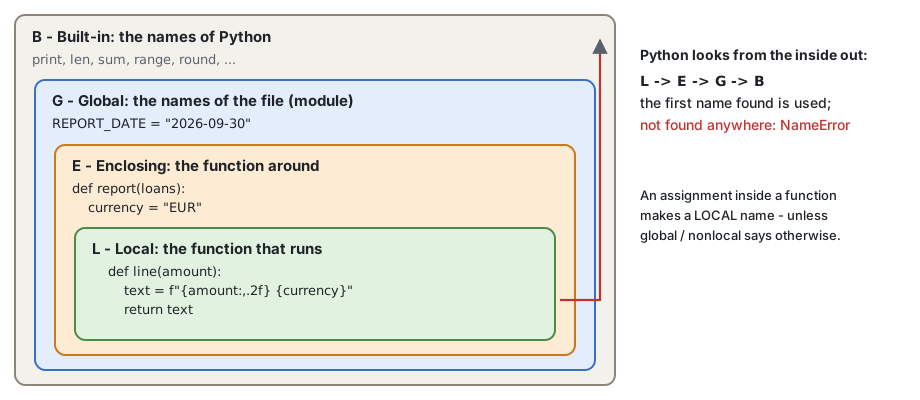
This is also why you should not use built-in names for your variables: sum = 0hides the built-in sum() in that scope (a common habit from other languages):
sum = 0                      # a global name sum hides the built-in sum
for n in [1, 2, 3]:
    sum += n
print(sum)
print(sum([1, 2, 3])) # TypeError: 'int' object is not callable| SAS | Python |
|---|---|
%local x; - a macro variable only in this macro | an assignment in a function (the default) |
%global x; | a name at the top level of the file; global x to assign it in a function |
%let outside macros | a global variable - use it for constants only |
A parameter is bound to the same object as the argument - Python does not copy it (session 3: names and references). For numbers and strings it makes no difference, because they cannot change. A list passed to a function can be changed by the function - and the caller sees the change:
def add_fee(amounts):
    amounts.append(10)            # changes the caller's list!

fees = [5, 7]
add_fee(fees)
print(fees)Animation
Function calls step by step: 5. A list passed to a function
Sometimes that is what you want (a function that fills a list). Usually it is a surprise. The safe default: do not change the arguments - build and return a new list:
def with_fee(amounts, fee=10):
    """A new list: each amount plus the fee. The input is not changed."""
    result = []
    for amount in amounts:
        result.append(amount + fee)
    return result

fees = [5, 7]
new_fees = with_fee(fees)
print(fees, new_fees)A docstring is a string right after the def line, in triple quotes. It says what the function does, what it takes and what it returns - for the people who will use it (you, in three months). Tools show it: help(), and VS Code when you hover over the name.
def expected_loss(pd_value, lgd, ead):
    """Return the expected loss of one exposure: EL = PD * LGD * EAD.

    pd_value: the probability of default, 0 ... 1
    lgd: the loss given default, 0 ... 1
    ead: the exposure at default, in EUR
    """
    return pd_value * lgd * ead

help(expected_loss)
print(expected_loss.__doc__.splitlines()[0])The conventions (PEP 257): the first line is a short sentence that says what the function does; then an empty line and the details.
Type hints document the types of the parameters and of the result:
def expected_loss(pd_value: float, lgd: float, ead: float) -> float:
    """Return the expected loss of one exposure: EL = PD * LGD * EAD."""
    return pd_value * lgd * ead

def is_late(days_past_due: int, limit: int = 30) -> bool:
    return days_past_due > limit

def total(amounts: list[float]) -> float:
    return sum(amounts)

def find_loan(loan_id: str, loans: list[tuple[str, float]]) -> tuple[str, float] | None:
    for loan in loans:
        if loan[0] == loan_id:
            return loan
    return None

print(expected_loss(0.02, 0.45, 100000))
print(is_late(45), total([1.5, 2.5]))
print(find_loan("L2", [("L1", 100.0), ("L2", 250.0)]))| Hint | Means |
|---|---|
int, float, str, bool | one value of this type |
list[float] | a list of floats |
tuple[str, float] | a tuple of a string and a float |
str | None | a string or None (since Python 3.10) |
-> None | the function returns nothing |
Python does not check type hints when the code runs - they are documentation:
def is_late(days_past_due: int) -> bool:
    return days_past_due > 30

print(is_late(45.5)) # works: hints are not checked at run timeBut editors can check them before you run anything: Pylance in VS Code (it comes with the Python extension) underlines a call with a wrong type. Pylance works out of the box, but its static type checking is turned off by default. To turn it on, add this setting to your VS Code settings (settings.json; open it with Ctrl+Shift+P -> "Preferences: Open User Settings (JSON)"):
{
  "python.analysis.typeCheckingMode": "basic"
}
In data work, hints are most useful on the functions that other people call.
Newer Python versions
Python 3.12 added the type statement for type aliases: type Amount = float. Python 3.14 (the Python of this site) evaluates annotations only when they are needed, so a hint can name a class that is defined later in the file. Neither is needed in this course - the hints above work in 3.12 and in every newer version.
In Python a function is an object, like a number or a list. So a function can be:
def greet(name):
    print(f"Hello, {name}")

foo = greet          # no brackets: the function itself, not a call
greet("Maria")
foo("Maria")         # the same function, another name
print(foo is greet)
def apply_function(func, value):
"""Apply a function to a value."""
return func(value)
def square(x):
return x * x
def cube(x):
return x ** 3
print(apply_function(square, 5))
print(apply_function(cube, 5))A function that takes or returns a function is a higher-order function. You already know some: sorted, min and max take a function as key (section 10). A report that can use any rounding rule:
import math

def total(amounts, rounding):
    result = 0
    for amount in amounts:
        result += rounding(amount)
    return result

amounts = [10.4, 20.6, 30.5]
print(total(amounts, round))
print(total(amounts, math.floor))
print(total(amounts, math.ceil))def multiply_by(n):
"""Return a function that multiplies its input by n."""
def multiply(x):
return x * n
return multiply
double = multiply_by(2)
to_bgn = multiply_by(1.95583) # the fixed BGN rate of the euro
print(double(5))
print(round(to_bgn(100), 2))The inner function remembers n from the call that made it, even after that call has ended. Such a function is called a closure.
def add(x, y):
    return x + y

def sub(x, y):
    return x - y

operations = {"add": add, "sub": sub}
print(operations["add"](4, 2))
print(operations["sub"](4, 2))A dictionary of functions replaces a long if / elif chain: the key chooses the function (a dispatch table).
Ideas from functional programming that make code easier to trust:
expected_loss(pd, lgd, ead) is pure.Pure functions are easy to test (call, compare the result), easy to reuse, and safe to run again on new data - exactly what a monthly report needs.
lambda A lambda expression creates a small function without a name, in one line:
lambda parameters: expressionIt can have any number of parameters, but only one expression - its value is the result. No return, no statements.
double = lambda x: x * 2
print(double(5))

# the same as:
def double(x):
    return x * 2
print(double(5))greet = lambda: "Hello, World!" # no parameters
print(greet())
add = lambda x, y: x + y # two parameters
print(add(4, 2))Do not give a lambda a name in real code (double = lambda ...) - that is what def is for, and def gives the function a real name in error messages (PEP 8). A lambda is for a function you need once, right here - most often as the key of a sort.
sorted() and list.sort() take a key: a function that is called for each item, and the items are sorted by its result. This is SQL ORDER BY with any expression:
data = [(1, "Z"), (2, "Y"), (3, "X")]
print(sorted(data, key=lambda t: t[1])) # by the second valueloans = [
("L000001", "investment", 1044231.30),
("L000002", "investment", 651927.30),
("L000003", "credit_card", 644.25),
("L000004", "overdraft", 5875.11),
]
# ORDER BY outstanding DESC
for loan in sorted(loans, key=lambda loan: loan[2], reverse=True):
print(loan)
# ORDER BY product, loan_id: a tuple as the key
print(sorted(loans, key=lambda loan: (loan[1], loan[0]))[0])key also works with min and max - the loan with the largest outstanding amount, not only the amount:
loans = [("L000001", 1044231.30), ("L000002", 651927.30), ("L000003", 644.25)]
print(max(loans, key=lambda loan: loan[1]))
print(min(loans, key=lambda loan: loan[1]))A named function works as a key too - key=len, key=str.lower:
print(sorted(["banana", "Cherry", "apple"]))                   # capitals first
print(sorted(["banana", "Cherry", "apple"], key=str.lower))    # ignore the case
print(sorted(["cherry", "fig", "banana"], key=len))Sorting is covered in depth in session 5. Reference: Sorting techniques.
The structure of a script that you can run again every month: the imports and the constants at the top, then the functions, and the main code at the bottom.
"""Outstanding amount and number of loans by days-past-due bucket."""

LOANS_FILE = "data/loans.csv"
BUCKETS = ("current", "1-30", "31-90", "90+")


def dpd_bucket(days_past_due):
    if days_past_due == 0:
        return "current"
    if days_past_due <= 30:
        return "1-30"
    if days_past_due <= 90:
        return "31-90"
    return "90+"


def read_loans(path):
    """The loans of a file as a list of (loan_id, outstanding, days_past_due)."""
    loans = []
    with open(path, encoding="utf-8") as file:
        file.readline()
        for line in file:
            fields = line.strip().split(",")
            loans.append((fields[0], float(fields[7]), int(fields[9])))
    return loans


def bucket_totals(loans, bucket):
    """The number and the outstanding sum of the loans in one bucket."""
    count, total = 0, 0.0
    for loan_id, outstanding, days_past_due in loans:
        if dpd_bucket(days_past_due) == bucket:
            count += 1
            total += outstanding
    return count, total


def print_report(loans):
    print(f"{'bucket':<10}{'loans':>7}{'outstanding':>18}")
    for bucket in BUCKETS:
        count, total = bucket_totals(loans, bucket)
        print(f"{bucket:<10}{count:>7}{total:>18,.2f}")


loans = read_loans(LOANS_FILE)
print_report(loans)Compare it with the first example of session 2: the same result, but now each part has a name, can be tested alone, and can be reused - read_loans in the next report, dpd_bucket in a check of the data.
In a file that is run as a script, the main code is often put under if __name__ == "__main__": - so that the functions can be imported by another file without running the report. Modules and import of your own files are the topic of session 10.
Open your copy of the Homework repository in VS Code (before the session: get the new tasks) and run the tasks from the terminal, in the repository root:
python 04-functions/practice/task1-first-functions.pyIn these tasks you write functions; the checks call them with many different values.
| Task | File | What you do |
|---|---|---|
| 1 | task1-first-functions.py | Small functions: interest, repaid share, is late, monthly rate |
| 2 | task2-defaults-keywords.py | Default values and keyword arguments: payment, Bulgarian number format |
| 3 | task3-args-and-tuples.py | *args, several return values: total, min / max / average, months and days |
| 4 | task4-portfolio-rules.py | The rules of the portfolio as functions: bucket, stage, grade, product group |
| 5 | task5-predict-scope.py | Predict the values: local and global names, a list passed to a function |
| 6 | task6-lambda-sorting.py | Sort and find with key and lambda; remove duplicates, keep the order |
| Topic | Remember |
|---|---|
| Define, call | def name(params): + an indented body; name(args) runs it - the brackets are required |
| Parameters | positional; defaults after the others; name=value in the call; *args a tuple |
| Defaults | never a list or a dict as a default - use None |
return | ends the function and gives a value; no return -> None; return a, b gives a tuple |
print / return | print shows, return gives - calculating functions return |
| Scope | names assigned in a function are local; LEGB: local, enclosing, global, built-in; avoid global - values in through parameters, out through return |
| References | a list passed to a function can be changed by it - return a new list instead |
| Documentation | a docstring in triple quotes; type hints x: float -> float are not checked at run time |
| Functions as values | pass a function as an argument; lambda x: ... for a short key |
| Sorting | sorted(items, key=lambda item: item[2], reverse=True) - SQL ORDER BY any expression |
| SAS macros | a macro writes code; a function runs and returns a value |
04-functions/homework.py (in the homework repository): a library of portfolio functions - read the loans and the rating scale from the files, find the PD of a rating, the expected loss of a loan, and the totals by stage. Every check must print OK.get_user_data() reads and checks the input (amount > 0, rate 0 - 50, years 1 - 30; ask again while a value is wrong) and returns a tuple; calc_payment(amount, rate, years) returns the payment; print_schedule(amount, rate, years) prints the schedule. Write a separate function for each check: is_valid_amount(), is_valid_rate(), is_valid_years(), each returning True or False.This part is not covered in class - it is for reading at home.
Decorators are not needed for the tasks of this course, but you will meet them in libraries (@property and @dataclass in session 11, @pytest.fixture, @app.get in web frameworks). This part explains the @ you will see. It uses *args, **kwargs and a function inside a function (the Advanced boxes of sections 4 and 6).
A decorator is a function that takes a function and returns a new, "decorated" function: it adds something before and after the original, without changing its code. decorated = decorator(original):
def stars_decorator(f):
    def wrapper():
        print("*" * 30)
        f()
        print("*" * 30)
    return wrapper

def greet():
    print("Howdy World!")

greet = stars_decorator(greet)       # decorate
greet()@ syntax @decorator above a def is a short way to write name = decorator(name):
def stars_decorator(f):
    def wrapper():
        print("*" * 30)
        f()
        print("*" * 30)
    return wrapper

@stars_decorator
def greet():
    print("Howdy World!")

greet()The wrapper must pass the arguments on, and return the result of the original. *args, **kwargs (section 4) take any arguments; functools.wraps keeps the name and the docstring of the original. A useful decorator - how long each step of a report takes:
import functools
import time

def timed(func):
    @functools.wraps(func)
    def wrapper(*args, **kwargs):
        start = time.perf_counter()
        result = func(*args, **kwargs)
        print(f"{func.__name__} took {time.perf_counter() - start:.4f} s")
        return result
    return wrapper

@timed
def total_outstanding(path):
    total = 0.0
    with open(path, encoding="utf-8") as file:
        file.readline()
        for line in file:
            total += float(line.split(",")[7])
    return total

print(f"{total_outstanding('data/loans.csv'):,.2f}")Exercise. Write a decorator announce that prints start: <name of the function> before the call and end after it, and use it on a function report() that prints the report. (Hint: func.__name__ is the name of the function.)
import functools

def announce(func):
    @functools.wraps(func)
    def wrapper(*args, **kwargs):
        print(f"start: {func.__name__}")
        result = func(*args, **kwargs)
        print("end")
        return result
    return wrapper

@announce
def report():
    print("the report")

report()Read more: Primer on Python decorators (Real Python).
*args, **kwargs, lambda, docstrings, annotations)Next session: lists, advanced - list comprehensions, sorting with key, zip, enumerate, map and filter, and a table as a list of rows.