English
Appearance
Today you will learn to:
+, *, in, len, min, max;range for sequences of numbers;UNION, INTERSECT and EXCEPT do - the Python way.From SQL to Python - the same question, two ways. Which clients have no loans?
SELECT client_id FROM clients
EXCEPT
SELECT client_id FROM loans;all_clients = set()
with open("data/clients.csv", encoding="utf-8") as file:
file.readline() # skip the header
for line in file:
all_clients.add(line.split(",")[0]) # the 1st column: client_id
with_loans = set()
with open("data/loans.csv", encoding="utf-8") as file:
file.readline()
for line in file:
with_loans.add(line.split(",")[1]) # the 2nd column: client_id
without_loans = all_clients - with_loans # EXCEPT
print(len(all_clients), "clients,", len(with_loans), "with loans")
print(sorted(without_loans))Session 2 used for on strings, lists and ranges. They are all sequences: containers that keep an ordered collection of values. The main sequence types:
| Type | Example | Can it change? |
|---|---|---|
list | ["mortgage", "consumer", "overdraft"] | yes |
tuple | ("L000001", "investment", 1044231.30) | no |
range | range(1, 13) | no |
str | "L000001" | no |
products = ["mortgage", "consumer", "credit_card", "consumer", "overdraft"]   # a list
record = ("L000001", "investment", 1044231.30)                                # a tuple
months = range(1, 13)                                                         # a range
loan_id = "L000001"                                                           # a string

for value in [products, record, months, loan_id]:
print(type(value).__name__, len(value))Every item of a sequence has a number - its position, or index. The index starts from 0.
Python counts from 0, SAS from 1
The first character of a string: SUBSTR(loan_id, 1, 1) in SAS and SQL, but loan_id[0] in Python. The first element of a SAS array is arr{1}; of a Python list it is items[0]. This is the most common mistake in the first weeks - count with care.
All sequences support the same common operations - you learn them once:
| Operation | Example | Result |
|---|---|---|
| length | len(s) | the number of items |
| indexing | s[0], s[-1] | the first, the last item |
| slicing | s[1:3] | a part of the sequence |
| concatenation | s + t | the two joined (not for range) |
| repetition | s * 3 | three times (not for range) |
| membership | x in s, x not in s | True / False |
| minimum, maximum | min(s), max(s) | the smallest, the largest item |
| counting | s.count(x) | how many times x is in s |
| searching | s.index(x) | the index of the first x |
Each type also has its own methods: lists can be sorted and changed, strings can be made upper case. Reference: Common sequence operations.
A list is a mutable (changeable) sequence of values:
Lists are the general-purpose container of Python. A list is close to a column of a table, or to a SAS array - but it can grow, and it lives in memory.
A list is written in square brackets, with the items separated by commas:
empty = []
stages = [1, 2, 3]
products = ["mortgage", "consumer", "credit_card"]
loan = ["L000001", "investment", 1044231.30, 8.83]     # different types
matrix = [                                             # a list of lists (session 5)
    [1, 2, 3],
    [4, 5, 6],
]
print(empty, stages, products)
print(loan)
print(len(products), len(empty), len(matrix))item = list_name[index]fruits = ["apple", "banana", "strawberry", "banana", "orange"]
print(fruits[0]) # the first item: apple
print(fruits[2]) # the third item: strawberry
print(fruits[-1]) # the last item: orangeAn index that does not exist is an error:
fruits = ["apple", "banana", "strawberry"]
print(fruits[3]) # 3 items: the indexes are 0, 1, 2list_name[index] = valuefruits = ["apple", "banana", "strawberry"]
fruits[1] = "plum" # change the second item
print(fruits)
fruits[-1] = "orange" # change the last item
print(fruits)del removes an item by its index:
fruits = ["apple", "plum", "orange"]
del fruits[1]
print(fruits)A list is the natural thing to loop over: for takes its items one by one, in order. Everything of session 2 works here - accumulators, break with a flag, and continue.
A sum, a count and the largest item in one loop - like SQL SUM, COUNT with a condition, and MAX:
amounts = [1044231.30, 651927.30, 644.25, 14286.75, 3200.00]

total = 0.0
count_small = 0
largest = amounts[0]                 # start with the first item
for amount in amounts:
    total += amount
    if amount < 10000:
        count_small += 1
    if amount > largest:
        largest = amount

print(f"total {total:,.2f}, average {total / len(amounts):,.2f}")
print(count_small, "small loans; the largest is", largest)
print(sum(amounts), max(amounts)) # the built-in functions do it too (section 4)Find an item: stop at the first match with break, and remember with a flag whether it was found (session 2):
watch_list = ["L000012", "L000025", "L000059"]
loan_id = "L000025"

found = False
for item in watch_list:
    if item == loan_id:
        found = True
        break

if found:
    print(loan_id, "is on the watch list")
else:
print(loan_id, "is not on the watch list")Try it
Change loan_id to "L000099" and predict the output before you run it. (For a plain "is it there?", loan_id in watch_list is shorter - section 4.)
Skip the items you do not want with continue - here the missing values of a column read from a file, which are empty strings:
ratings = ["3", "", "7", "2", "", "10"]

known = 0
total = 0
for rating in ratings:
    if rating == "":                # a missing value: skip it
        continue
    known += 1
    total += int(rating)

print(known, "known ratings, the average is", total / known)The loop gives the items, not their positions. If you need the position, count it yourself (session 5 shows enumerate, which does it for you):
amounts = [800.0, 0.0, 15900.0, 0.0]

position = 0
for amount in amounts:
    if amount == 0:
        print("a zero amount at index", position)
position += 1Two lists, one loop inside the other - every pair, like a CROSS JOIN in SQL:
products = ["mortgage", "consumer"]
currencies = ["EUR", "USD"]

for product in products:
    for currency in currencies:
        print(product, currency)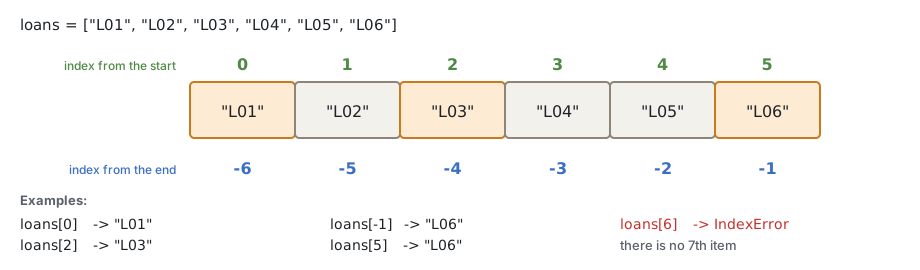
numbers = [1, 2, 3, 4, 5]
print(numbers[0], numbers[1], numbers[2], numbers[3], numbers[4])
print(numbers[-1], numbers[-2], numbers[-3], numbers[-4], numbers[-5])Negative indexes are handy for "the last ones": the last month of a list of monthly values is values[-1], whatever the length of the list.
[start:stop:step] A slice takes a part of a sequence:
sequence[start:stop:step]start - the index of the first item taken (included); empty = from the start;stop - the index where the slice stops (this item is not included); empty = to the end;step - take every n-th item; empty = 1. A negative step goes backwards.a[start:stop] items from start up to stop - 1
a[start:] items from start to the end
a[:stop] items from the beginning up to stop - 1
a[:] all items - a copy of the whole sequenceThe rule "the stop is not included" is the same as in range (session 2). It has a nice side: a[:3] is the first 3 items, a[3:] the rest, and a[2:5] has 5 - 2 = 3 items.
An easy way to see it: think of the numbers of a slice as the cuts between the items, not as the items. loans[1:4] cuts at 1 and at 4 and takes what is between:
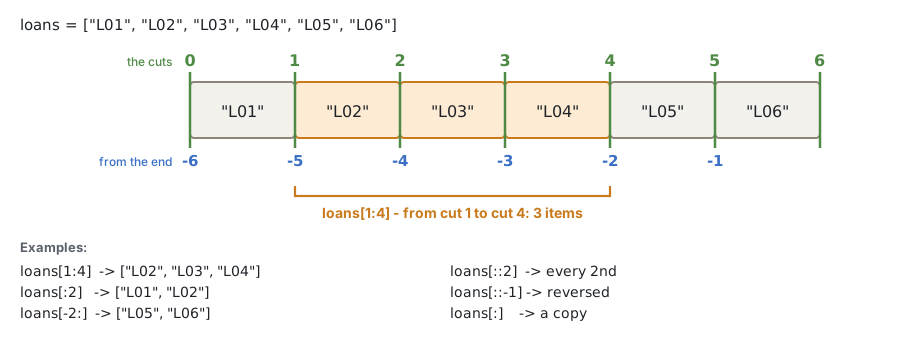
numbers = [0, 1, 2, 3, 4, 5, 6, 7, 8, 9]
print(numbers[2:5])      # [2, 3, 4]
print(numbers[1:9:2])    # every 2nd item: [1, 3, 5, 7]
print(numbers[:3])       # the first 3: [0, 1, 2]
print(numbers[-3:])      # the last 3: [7, 8, 9]
print(numbers[::-1])     # all, reversed
numbers_copy = numbers[:]
print(numbers_copy)With a negative step the slice goes backwards, so start must be the larger index. For data work, [::-1] (all, reversed) is the one you need.
numbers = [0, 1, 2, 3, 4, 5, 6, 7, 8, 9]
print(numbers[:-4:-1])   # the last 3, reversed: [9, 8, 7]
print(numbers[7:2:-1])   # from index 7 down to index 3: [7, 6, 5, 4, 3]
print(numbers[2:7:-1]) # [] - you cannot go down from 2 to 7A slice never gives an IndexError - out of range, it simply takes what there is:
numbers = [0, 1, 2]
print(numbers[1:100])
print(numbers[5:10])SUBSTR A string is a sequence of characters, so the same indexes and slices work - this is the Python version of SUBSTR in SAS and SQL:
| SAS / SQL | Python |
|---|---|
SUBSTR(loan_id, 1, 1) | loan_id[0] |
SUBSTR(loan_id, 2) | loan_id[1:] |
SUBSTR(report_date, 1, 4) | report_date[:4] |
SUBSTR(report_date, 6, 2) | report_date[5:7] |
greeting = "Hello, World!"
print(greeting[1:5])            # 'ello'

loan_id = "L000123"
print(loan_id[0], loan_id[1:], int(loan_id[1:]))

report_date = "2026-09-30"
year, month, day = report_date[:4], report_date[5:7], report_date[8:]
print(year, month, day)Strings cannot be changed: loan_id[0] = "X" is an error. String methods (session 7) make new strings.
The same in pandas
pandas (session 14) uses the same rules. iloc takes rows and columns by position - from 0, without the stop; .str[...] takes the same slice of every text in a column:
import pandas as pd

loans = pd.read_csv("data/loans.csv")
print(loans.iloc[:3, :4])                     # the first 3 rows, the first 4 columns
print(loans["start_date"].str[:4].head(3)) # SUBSTR(start_date, 1, 4) for every row+ and repetition * + joins two sequences of the same type into a new one; * repeats a sequence. The multiplier must be a whole number.
num_list = [1, 2, 3]
alpha_list = ["a", "b", "c"]
print(num_list + alpha_list)      # a new list

record = ("L000001", "investment")
print(record + (1044231.30,))     # a new tuple, one item longer

print(num_list * 3)
print(alpha_list * 3)
print([0.0] * 12) # 12 months, all 0.0 - a common start valueOnly strings, lists and tuples can be joined and repeated. A range cannot (but you can make a list of it first: list(range(3)) * 2).
+ makes a new list. Joining two lists one under the other is UNION ALL in SQL, or SET a b; in a SAS DATA step - for example, the late loans of two months:
late_august = ["L000002", "L000014", "L000025"]
late_september = ["L000014", "L000059"]
late_both = late_august + late_september    # UNION ALL: L000014 is there twice
print(late_both)
print(len(late_both))(Section 12 shows UNION without the duplicates.)
in, not in x in sequence is True when x is one of the items - like IN (...) in SQL and SAS:
fruits = ["apple", "banana", "strawberry"]
numbers = [1, 2, 3]
print("banana" in fruits)
print("banana" in numbers)
print("banana" not in fruits)
print("banana" not in numbers)

r = range(0, 10)
print(3 in r, 21 in r)

product = "consumer"
if product in ["mortgage", "consumer", "credit_card", "overdraft"]:
print("retail")For strings, in looks for a part of the string: "USD" in "EUR,USD" is True.
len, min, max, sum, count, index outstanding = [1044231.30, 651927.30, 644.25, 5875.11]
print(len(outstanding))
print(min(outstanding), max(outstanding))
print(sum(outstanding))
print(sum(outstanding) / len(outstanding)) # the average
stages = [1, 2, 1, 1, 3, 2, 1]
print(stages.count(1)) # how many times 1 is in the list
print(stages.index(3)) # the index of the first 3min and max work on strings too (alphabetically, session 2). sum only on numbers. index gives a ValueError when the value is not in the list - test with in first.
list(): a list from any sequence list() makes a new list from the items of any sequence (any iterable):
l = list()                       # the same as l = []
print(l)

point3d = (4, 0, 3)
print(list(point3d))             # from a tuple

digits = range(0, 10)
print(list(digits))              # from a range

user_name = "ada byron"
print(list(user_name)) # from a string: one item per charactersplit split() (session 1) cuts a string into a list of strings:
row = "L000002,C0132,investment,EUR,2019-04-16,2029-04-16,1977400.00,651927.30,5.44,35,2"
fields = row.split(",")
print(len(fields), fields[2], fields[-2])

text = "some words delimited by spaces"
print(text.split()) # without an argument: by spacesappend Start with an empty list and append a value in each iteration. It is the Python version of the SAS OUTPUT statement: in SAS, OUTPUT writes a row of the DATA step to the output data set; in Python, append adds an item to the list.
late_loans = []

with open("data/loans.csv", encoding="utf-8") as file:
    file.readline()
    for line in file:
        fields = line.strip().split(",")
        if int(fields[9]) > 90:              # days_past_due
            late_loans.append(fields[0])     # loan_id

print(len(late_loans), "loans more than 90 days past due")
print(late_loans[:5], "...")data late_loans;
set loans;
if days_past_due > 90 then output;
keep loan_id;
run;| Method | What it does |
|---|---|
lst.append(x) | adds x at the end |
lst.extend(other) | adds all items of other at the end |
lst.insert(i, x) | inserts x before the index i |
lst.pop() | removes the last item and returns it |
lst.pop(i) | removes the item at index i and returns it |
lst.remove(x) | removes the first item equal to x (ValueError if there is none) |
lst.clear() | removes all items |
lst.index(x), lst.count(x) | the index of the first x; how many x |
lst.reverse() | reverses the list in place |
lst.sort() | sorts the list in place; sort(reverse=True): from the largest |
lst.copy() | a new list with the same items (section 7) |
del lst[i], del lst[i:j] | removes an item, a slice |
fruits = ["apple", "banana", "strawberry"]

fruits.append("plum")               # at the end
print(fruits)

fruits.insert(2, "NEW")             # before the index 2
print(fruits)

item = fruits.pop()                 # remove the last item, and get it
print(item, fruits)

item = fruits.pop(2)                # remove the item at index 2
print(item, fruits)

fruits.remove("banana")             # remove by value
print(fruits)

fruits.extend(["kiwi", "lemon"])    # add several items
print(fruits)

fruits.reverse()
print(fruits)

numbers = [1, 3, 4, 2]
numbers.sort()
print(numbers)
numbers.sort(reverse=True)
print(numbers)More: More on lists in the tutorial.
append or extend? a = [1, 2]
a.append([3, 4]) # one item: the list [3, 4]
print(a, len(a))
b = [1, 2]
b.extend([3, 4]) # two items: 3 and 4
print(b, len(b))The loop goes through the list by position. When you remove an item, the next one moves into its place - and the loop skips it:
amounts = [0.0, 0.0, 500.0, 0.0]
for amount in amounts:
    if amount == 0:
        amounts.remove(amount)
print(amounts) # [500.0, 0.0] - one zero is still thereBuild a new list instead - the same as writing a new data set in SAS:
amounts = [0.0, 0.0, 500.0, 0.0]
non_zero = []
for amount in amounts:
    if amount != 0:
        non_zero.append(amount)
print(non_zero)(Session 5 does the same in one line, with a list comprehension.)
None append, sort, reverse and the others change the list in place. They return None, not the list. A classic bug:
numbers = [3, 1, 2]
numbers = numbers.sort()       # wrong: sort() returns None
print(numbers)numbers.sort() sorts the list and returns None, and numbers = ... binds the name to that None - the sorted list is lost. Write only numbers.sort(), or use sorted() (next).
sort() or sorted()? lst.sort() sorts this list. Only lists have it.sorted(x) returns a new, sorted list, and does not change x. It works on any sequence: a tuple, a string, a set, a range.names = ["Maria", "Ivan", "Asen"]
sorted_names = sorted(names)
print(names) # not changed
print(sorted_names)
print(sorted("python")) # the characters of a string, sorted
print(sorted(names, reverse=True))Sorting compares the items with < (session 2): strings alphabetically - capital letters before small ones - and a mix of numbers and strings is an error:
print(sorted(["banana", "Cherry", "apple"]))
print(sorted([3, "1", 2]))SAS PROC SORT and SQL ORDER BY can sort by a column, or by several. For records kept as tuples, put the column to sort by first (section 8, "Sort records"); the general way is sorted(..., key=...): sessions 4 and 5.
The same in pandas
The methods of pandas work like sorted(): they return a new table and do not change the old one (session 14). Keep the result in a name:
import pandas as pd

loans = pd.read_csv("data/loans.csv")
by_size = loans.sort_values("outstanding", ascending=False)   # ORDER BY outstanding DESC
print(loans["loan_id"].head(3).tolist())      # not changed
print(by_size["loan_id"].head(3).tolist()) # a new, sorted tableSession 1 showed that a variable is a name bound to an object. With numbers and strings this hardly matters, because they cannot change. A list can change - and then it matters a lot:
original = [1, 2, 3]
new_list = original          # not a copy: the same list has a second name

new_list[0] = 100
print(original)              # [100, 2, 3] - changed too!
print(new_list)
print(original is new_list, id(original) == id(new_list))new_list = original does not copy anything. Both names point to the same list object in memory, so a change through one name is seen through the other. is (and id()) shows it.
Animation
Lists and references:1. A list changes in place, 2. Two names, one list, 3. A copy, 4. sort() and sorted()
When you need an independent list, make a copy. Three ways give the same:
original = [1, 2, 3]

copy1 = original[:]          # a slice of everything
copy2 = original.copy()      # the copy() method
copy3 = list(original)       # list() makes a new list

copy1.append(4)
print(original, copy1, copy2, copy3)
print(original is copy1)These are shallow copies: the new list has the same items. When the items are lists themselves (a table as a list of rows), the rows are still shared - session 5 explains shallow and deep copies.
Try it
In the first example of this section, write new_list = original.copy() instead of new_list = original. Predict what print(original) and original is new_list show now, then run it.
A tuple is an immutable sequence: once created, it cannot change - no item can be added, removed or replaced.
count and index.A tuple is written in round brackets, with the items separated by commas:
t = ()
print(type(t))              # an empty tuple

t = (99,)                   # one item: note the comma!
print(type(t), t)

t = (99)                    # without the comma, it is just 99 in brackets
print(type(t), t)

point3d = (4, 0, 3)
print(point3d)

point3d = 4, 0, 3           # the brackets may be left out
print(point3d)It is the comma that makes a tuple, not the brackets. That is why x, y = 1, 2 (session 1) works: the right side is a tuple.
address = ("Bulgaria", "Sofia", "Nezabravka str", 14)
country = address[0]
town = address[1]
print(country, town, address[-1])

ada_birth_date = (10, "December", 1815)
print(f"Ada was born on {ada_birth_date[1]} {ada_birth_date[0]}, {ada_birth_date[2]}")
address = ("Bulgaria", "Sofia", "Nezabravka str", 14)
address[0] = "France"To "change" a tuple, you make a new one (the name moves to it, like with numbers):
record = ("L000001", "investment", 1)
record = record[:2] + (2,)          # a new tuple with stage 2
print(record)Animation
Lists and references:5. A tuple cannot change
A tuple cannot change which objects it holds. If one of them is a list, the list itself can still change:
t = ([1, 2, 3], "fixed")
t[0][2] = 100              # change the list inside the tuple
print(t)users = (
["Ivan", "Ivanov", 34],
["Maria", "Ivanova", 36],
)
users[0][2] = 100 # the list inside: works
print(users[0])
users[0] = ["Petar", "Petrov", 45] # the tuple itself: TypeErrorThe same holds for a tuple of lists - a fixed structure of groups that can change inside:
products = (
    ["Shirt", "Pants"],      # the names
    [20, 35],                # the quantities
)
products[1][0] = 100         # a quantity can change
print(products)Animation: 6. A list inside a tuple.
A tuple (or a list) can be unpacked into several names at once - the number of names must be the number of items:
record = ("L000002", "investment", 651927.30)

loan_id, product, outstanding = record
print(loan_id)
print(product)
print(outstanding)loan_id, product = ("L000002", "investment", 651927.30) # 2 names, 3 itemsWhen you need only some of the values, you still need a name for each of the others - the counts must match. _ is the usual name for a value you do not need. It is a normal name, but it tells the reader "ignored":
row = ("L000002", "C0132", "investment", "EUR", 651927.30)

loan_id, _, product, _, outstanding = row       # skip client_id and currency
print(loan_id, product, outstanding)Try it
Remove one _ from the unpacking and predict the error before you run it.
A name with a star * takes "the rest", as a list:
row = ("L000002", "C0132", "investment", "EUR", 651927.30)
loan_id, client_id, *other = row
print(loan_id, client_id, other)

first, *middle, last = [1, 2, 3, 4, 5]
print(first, middle, last)

loan_id, *_ = row                               # only the first value
print(loan_id)A list of tuples is a small table: each tuple is a row, each position a column. for with unpacking (session 2) reads it row by row:
loans = [
    ("L000001", "investment", 1044231.30, 0),
    ("L000002", "investment", 651927.30, 35),
    ("L000003", "credit_card", 644.25, 0),
    ("L000014", "consumer", 14286.75, 200),
]

print(loans[1])             # the second row
print(loans[1][2])          # its third column
print(loans[-1][0])         # the first column of the last row

for loan_id, product, outstanding, days_past_due in loans:
    if days_past_due > 30:
print(loan_id, product, outstanding)A common use of a list of tuples - a label with its value - and splitting it into two lists again:
exposures = [("L000001", 1044231.30), ("L000002", 651927.30), ("L000003", 644.25)]

loan_ids = []
amounts = []
for loan_id, amount in exposures:
    loan_ids.append(loan_id)
    amounts.append(amount)
print(loan_ids)
print(amounts)Tuples are also used for several return values of a function (session 4) and as keys of a dictionary (session 6), where a list is not allowed.
Tuples are compared like words, item by item: the first items first; only when they are equal, the second items, and so on. So sorted on a list of tuples sorts by the first item, then by the second - like ORDER BY col1, col2 in SQL:
print((2, "b") < (10, "a"))         # True: 2 < 10, the rest is not looked at
print((5, "b") < (5, "c"))          # True: 5 == 5, so "b" < "c" decides

pairs = [(5, "L000003"), (12, "L000001"), (5, "L000002")]
print(sorted(pairs))                # by the number, then by the id
print(sorted(pairs, reverse=True)) # from the largestTo sort records by another column, build new tuples with that column first - the largest exposures:
loans = [
    ("L000001", "investment", 1044231.30),
    ("L000002", "investment", 651927.30),
    ("L000003", "credit_card", 644.25),
    ("L000014", "consumer", 14286.75),
]

by_size = []
for loan_id, product, outstanding in loans:
    by_size.append((outstanding, loan_id))      # the amount first

for outstanding, loan_id in sorted(by_size, reverse=True)[:2]:
print(loan_id, f"{outstanding:,.2f}")Two pairs of brackets
by_size.append((outstanding, loan_id)): the outer brackets belong to the call, the inner ones make the tuple. append(outstanding, loan_id) gives two values to append - a TypeError.
In a plain tuple, loan[2] does not say what the third column is. A named tuple gives the positions names - a lightweight record:
from collections import namedtuple

Loan = namedtuple("Loan", ["loan_id", "product", "outstanding"])
loan = Loan("L000001", "investment", 1044231.30)

print(loan)
print(loan.outstanding)          # by name
print(loan[2])                   # still by position
loan_id, product, outstanding = loanClasses and data classes (sessions 11 - 12) go further: records that can also check their data and have their own methods.
| List | Tuple | |
|---|---|---|
| Brackets | [1, 2, 3] | (1, 2, 3) |
| Can change | yes: add, remove, sort | no |
| Use for | a collection that grows: the loans of a report, the values of a column | a fixed record: one row, a date, a pair |
| Memory, speed | a little more, a little slower | a little less, a little faster |
import sys

as_list = [1044231.30, 651927.30, 644.25]
as_tuple = (1044231.30, 651927.30, 644.25)
print(sys.getsizeof(as_list), "bytes for the list")
print(sys.getsizeof(as_tuple), "bytes for the tuple")(The exact numbers depend on the Python version; the tuple is always smaller.)
Rule of thumb: a list for many values of the same kind (all loan ids), a tuple for a few values of different kinds that belong together (one loan).
list() and tuple() convert in both directions:
address = ("Bulgaria", "Sofia", "Nezabravka str", 14)
address = list(address)          # now it can change
address[3] = 25
print(address)

fruits = ["apple", "banana", "strawberry", "banana", "orange"]
print(tuple(fruits))
print(tuple(range(0, 10)))
print(tuple("ada byron"))range range gives an immutable sequence of whole numbers:
range(stop)
range(start, stop)
range(start, stop, step)
stop is the only required argument. The numbers end at stop - 1.start is 0 when left out; step is 1 when left out.step can be negative, but not 0 (ValueError).Reference: Ranges.
print(list(range(0, 10)))        # 0 ... 9
print(list(range(10)))           # the same
print(list(range(2, 10, 2)))     # 2, 4, 6, 8
print(list(range(9, -1, -1)))    # 9 ... 0, backwards
print(list(range(-3, 4)))        # -3 ... 3
print(list(range(9, -1, 1))) # empty: you cannot go from 9 up to -1The SAS DO loops and their range are in the table of session 2, section 10. New today: a backwards range, do i = 10 to 1 by -1; is range(10, 0, -1).
A range keeps only start, stop and step, and calculates each number when it is needed. When you print a range, you see only the "formula". To see the numbers, make a list or a tuple of it - or loop over it:
r = range(0, 10, 2)
print(r)
print(list(r))
for i in r:
print(i, end=" ")A range of a billion numbers is as small in memory as a range of ten - a list keeps every number:
import sys

print(sys.getsizeof(range(10)), sys.getsizeof(range(1_000_000_000)))
print(sys.getsizeof(list(range(1000)))) # a list keeps every numberlen, indexes, slices and in work on a range, and fast:
r = range(0, 1_000_000, 5)
print(len(r), r[3], r[-1], 500 in r, 501 in r)
print(range(10)[:3])A set is an unordered collection of unique values - the sets of mathematics.
Sets are used to test membership, to remove duplicates, and to compare groups: union, intersection, difference (section 12).
A set is written in curly brackets:
set_of_immutables = {"a", 1, "b", 2, 3}
print(set_of_immutables)

int_dup_numbers = {1, 2, 3, 1, 2, 4, 3, 5, 1, 2, 3}
print(int_dup_numbers)                       # the duplicates are gone
print(int_dup_numbers == {1, 2, 3, 4, 5}) # order and duplicates do not matterset_of_mutables = {[1, 2, 3], ["a", "b"]} # TypeError: a list is unhashable{} is not an empty set
{} is an empty dictionary (session 6): a collection of key: value pairs, where a set has only values. An empty set is set():
print(type({}), type(set()))SELECT DISTINCT In SQL, SELECT DISTINCT gives each value of a column once. In SAS, you write the same in PROC SQL, or use PROC SORT with NODUPKEY:
SELECT DISTINCT product FROM loans;proc sort data=loans(keep=product) out=products nodupkey;
by product;
run;In Python, set() makes a set from any sequence - the duplicates disappear:
l1 = [1, 2, 1, 3, 2, 5, 3]
l2 = list(set(l1))
print(l2)

products = ["consumer", "mortgage", "consumer", "overdraft", "mortgage"]
print(set(products))                 # SELECT DISTINCT product
print(len(set(products)))            # COUNT(DISTINCT product)
print(sorted(set(products))) # SELECT DISTINCT ... ORDER BYOn the data - the distinct products in loans.csv:
products = set()
with open("data/loans.csv", encoding="utf-8") as file:
    file.readline()
    for line in file:
        products.add(line.split(",")[2])
print(len(products), sorted(products))The order of a set is not kept
A set does not remember the order in which values came. Print the same set of strings in two runs of a program, and the order can be different. When the order matters - in a report, in a test - use sorted(the_set). (To remove duplicates and keep the first order: list(dict.fromkeys(items)), session 6.)
my_set = {1, 2, 3}
my_set.add(4)
print(my_set)
my_set.add(2)               # already there: nothing changes
print(my_set)
my_set.discard(3)           # remove a value (no error if it is not there)
print(my_set)len, in, min, max, sum and for work as with lists.
remove, pop, clearremove(x) removes x too, but stops with a KeyError when x is not in the set. pop() removes and returns some item (which one is not defined), clear() empties the set.
my_set = {1, 2, 3}
my_set.remove(2)
print(my_set)
my_set.remove(5) # KeyError: 5 is not therein A set is a hash table inside: Python calculates from the value where it must be, and looks only there. A list is searched item by item, from the start. For in on a large collection, a set is much faster; for going through all items, and for access by index, a list is better.
So when you check many values against a long list of allowed codes - a nomenclature - put the codes into a set first.
import time

large_list = list(range(1_000_000))
large_set = set(large_list)

start = time.perf_counter()
found = 999_999 in large_list
list_time = time.perf_counter() - start

start = time.perf_counter()
found = 999_999 in large_set
set_time = time.perf_counter() - start

print(f"in a list: {list_time:.6f} s")
print(f"in a set: {set_time:.6f} s")frozensetA frozenset is an immutable set. Because it cannot change, it can be an item of a set, or a key of a dictionary:
pairs = {frozenset({"EUR", "USD"}), frozenset({"EUR", "BGN"})}
print(frozenset({"USD", "EUR"}) in pairs) # the order does not matterUNION, INTERSECT, EXCEPT 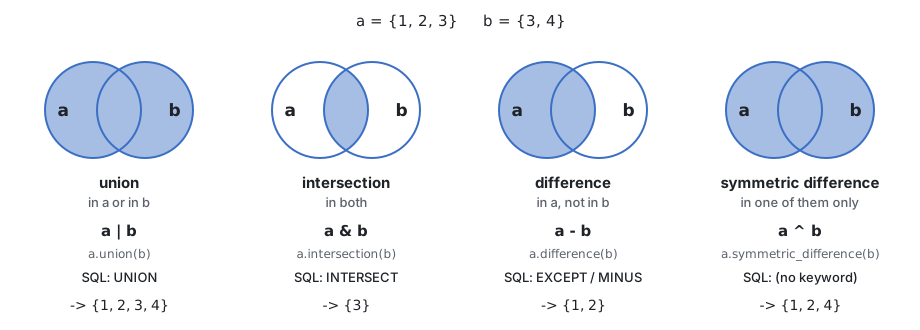
| Operation | Operator | Method | Result | SQL (also SAS PROC SQL) |
|---|---|---|---|---|
| union | a | b | a.union(b) | in a or in b | UNION |
| intersection | a & b | a.intersection(b) | in both | INTERSECT |
| difference | a - b | a.difference(b) | in a, not in b | EXCEPT (older Oracle: MINUS) |
| symmetric difference | a ^ b | a.symmetric_difference(b) | in one of them, not in both | - |
Each operation returns a new set.
set1 = {1, 2, 3, 4}
set2 = {5, 4}

print(set1 | set2, set1.union(set2))
print(set1 & set2, set1.intersection(set2))
print(set1 - set2, set1.difference(set2))
print(set1 ^ set2, set1.symmetric_difference(set2))UNION or UNION ALL?
SQL UNION removes duplicates - that is a set union, a | b. UNION ALL keeps every row - that is joining two lists, list_a + list_b (section 4).
The methods accept any sequence, the operators only sets. a.isdisjoint(b) is True when the two sets have no common items.
regions = {"Sofia", "Varna"}
print(regions.union(["Ruse", "Sofia"]))
print(regions.isdisjoint({"Ruse", "Pleven"}))
print(regions | ["Ruse", "Sofia"]) # TypeErrorThe client ids with a loan at the end of August and at the end of September:
august = {"C0001", "C0002", "C0003", "C0005", "C0008"}
september = {"C0002", "C0003", "C0005", "C0013", "C0021"}

print("new:     ", sorted(september - august))      # EXCEPT
print("closed:  ", sorted(august - september))
print("stayed:  ", sorted(august & september))      # INTERSECT
print("all:     ", len(august | september))         # UNION
print("changed: ", sorted(august ^ september)) # new or closedTry it
Add "C0001" to september and predict the five lines before you run the block.
required = {"id_card", "income_statement", "collateral_valuation", "insurance"}
submitted = {"id_card", "insurance", "bank_statement"}

print("Received:", ", ".join(sorted(required & submitted)))
print("Missing: ", ", ".join(sorted(required - submitted)))
print("Extra: ", ", ".join(sorted(submitted - required)))", ".join(...) makes one string of the items, with ", " between them (session 7).
| Test | Operator | Method |
|---|---|---|
every item of a is in b | a <= b | a.issubset(b) |
b has every item of a | b >= a | b.issuperset(a) |
These are quick checks of the data, like the checks you write in SQL before a join:
allowed_currencies = {"EUR", "USD"}

currencies = set()
loan_clients = set()
with open("data/loans.csv", encoding="utf-8") as file:
    file.readline()
    for line in file:
        fields = line.split(",")
        loan_clients.add(fields[1])
        currencies.add(fields[3])

clients = set()
with open("data/clients.csv", encoding="utf-8") as file:
    file.readline()
    for line in file:
        clients.add(line.split(",")[0])

print("only allowed currencies:", currencies <= allowed_currencies)
print("every loan has a known client:", loan_clients <= clients)
print("loans of unknown clients:", loan_clients - clients) # LEFT JOIN ... WHERE c.client_id IS NULLThe same in pandas
The same check on two tables before a join - with set() of a column, or with isin (session 15; there merge(..., indicator=True) shows the rows without a match):
import pandas as pd

loans = pd.read_csv("data/loans.csv")
clients = pd.read_csv("data/clients.csv")
print(set(loans["client_id"]) - set(clients["client_id"]))    # EXCEPT
print(loans["client_id"].isin(clients["client_id"]).all()) # every loan has a known clientOpen your copy of the Homework repository in VS Code (before the session: get the new tasks) and run the tasks from the terminal, in the repository root:
python 03-lists-tuples-sets/practice/task1-predict-sequences.py| Task | File | What you do |
|---|---|---|
| 1 | task1-predict-sequences.py | Predict 14 indexes, slices and operations, then check |
| 2 | task2-slices.py | Parts of ids and dates; quarters of a year of monthly values |
| 3 | task3-list-methods.py | A watch list: add, insert, remove, sort, count |
| 4 | task4-tuples.py | Records as tuples: unpack, read, sum; a list of tuples |
| 5 | task5-sets.py | The clients of two months: new, closed, stayed; a credit file |
| 6 | task6-from-file.py | From loans.csv and clients.csv: distinct values, lists, set checks |
Help for the tasks and the homework
(99,), sort / sorted and the sets need sections 6, 8, 11 and 12). Task 3: sections 6 - 7. Task 4: section 8. Tasks 5 - 6 and the homework: sections 8 - 12. If a section was not covered in class yet, start with the tasks before it, or read the section first. A part you have not started prints TODO, not FAIL.type(x).__name__ is the name of the type, as text: "tuple", "list".backup first, with watch.copy() - backup = watch would only give the same list a second name (section 7). extend adds several items with one call; pop() removes the last item and returns it; sort(reverse=True) sorts from the largest. The methods change watch and return None: write watch.sort(), not watch = watch.sort() (section 6).record[:-1] is the record without its last item (a new tuple), (40,) is a tuple with one item (section 8), and + joins the two.total = 0.0 and three empty lists.both_currencies - in the loop, collect the clients of the EUR loans in one set and of the USD loans in another; after the loop, intersect the two sets with &.file.readline() skips the header, then fields = line.strip().split(",") in the loop. The columns are in the order of the header line (task 6 lists them; the sample data page too): fields[0] is the first one.loans.append((fields[0], ..., float(fields[7]), int(fields[10]))) - note the two pairs of brackets (section 8).clients.csv and keep the region when the client is in that set.| Topic | Remember |
|---|---|
| Sequences | list, tuple, range, str: ordered; len, in, +, *, min, max, count, index |
| Indexes | from 0; -1 is the last; a wrong index is an IndexError |
| Slices | s[start:stop:step], the stop is not included; s[:3] the first 3, s[-3:] the last 3, s[::-1] reversed, s[:] a copy |
| Lists | [...], mutable; append, extend, insert, pop, remove, sort; the methods return None |
| Sorting | lst.sort() changes the list; sorted(x) returns a new list |
| References | b = a is the same list with two names; a copy: a[:], a.copy(), list(a) |
| Tuples | (...), immutable, the comma makes it: (99,); unpacking a, b, c = t, _ for a value you do not need; records |
range | range(start, stop, step), stop not included; small in memory |
| Sets | {...} / set(), unique, unordered; add, discard; fast in; print with sorted() |
| Set operations | | is SQL UNION, & is INTERSECT, - is EXCEPT; ^ symmetric difference; <= subset |
03-lists-tuples-sets/homework.py (in the homework repository): a portfolio snapshot from loans.csv - the loans as a list of tuples, the five largest exposures, the distinct products, the clients with both a mortgage and a consumer loan, and the regions of the stage 3 clients. Every check must print OK.names.py asks how many names the user will enter, reads them with input() in a loop into a list, and prints them sorted, without duplicates, and how many were duplicates."Racecar"). Check it with a slice, for words typed by the user.03-lists-tuples-sets/notebook.ipynb - short extra tasks on the topics of today in a Jupyter notebook, each with a check cell. Open it in VS Code and select the .venv kernel.del, tuples and sequences, sets)copyNext session: functions - your own def, parameters and return values, and why a function is the Python version of a SAS macro.